What's new

iOS 7.0.3 is out now

AQ_OC

iPF Novice
Joined
Apr 28, 2011
Messages
6,415
Reaction score
435
Location
SC
I'm downloading it now on my iPhone 4s and iPad mini....
 
It appears that the zoom in/out animations have been subdued a bit in iOS 7.0.3. Good news for those who were experiencing motion sickness.
 
It appears that the zoom in/out animations have been subdued a bit in iOS 7.0.3. Good news for those who were experiencing motion sickness.

Just did my iPad 2 (will do wife's Mini soon) - took a while (presumably the Apple servers are busy) - I agree that the zooming does seem slower - did not bother me but hopefully will help others - Dave :)
 
The Reduce Motion setting in Accessibility now stops the fly-in-out effects, for those that were bothered by the motion.

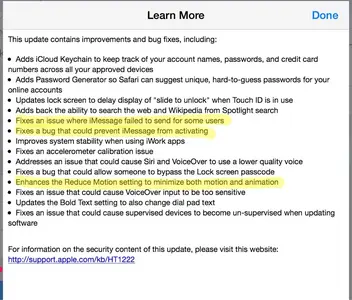
Here is the list of things addressed with iOS 7.03. I've highlighted the fixes that seemed to generate the most posts on the forum; in my purely subjective opinion, of course.
 

Attachments

  • image-4219043645.webp
    image-4219043645.webp
    69.1 KB · Views: 591
The Reduce Motion setting in Accessibility now stops the fly-in-out effects, for those that were bothered by the motion.

Here is the list of things addressed with iOS 7.03. I've highlighted the fixes that seemed to generate the most posts on the forum; in my purely subjective opinion, of course.

Thanks,TPoet! Great help! :)


Peace begins with a smile.
M Teresa
 
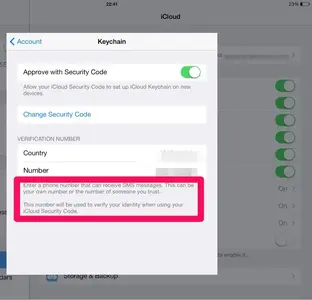
Unfortunately, it appears I won't be allowed to use the new Keychain features because I don't have a cell phone. I cannot set it up without a phone number to receive text messages.

This post handcrafted from 100 percent post-consumer recycled electrons.
 
Unfortunately, it appears I won't be allowed to use the new Keychain features because I don't have a cell phone. I cannot set it up without a phone number to receive text messages.

This post handcrafted from 100 percent post-consumer recycled electrons.

I remember that coming up on the iPad. I don't remember if you could skip it.

Strangely it was not asked on either the iPhone or the iMac. The iPad was the second (after the iPhone) device to get set up. On the iPhone I was asked if I wanted to use my unlock code for keychain, I said yes. From that point on activating iCloud Keychain on my other devices was a combination of my Apple ID and that passcode.
 
Unfortunately, it appears I won't be allowed to use the new Keychain features because I don't have a cell phone. I cannot set it up without a phone number to receive text messages. This post handcrafted from 100 percent post-consumer recycled electrons.
You also can enter the phone number of someone you trust. You need access to that phone when you set up Keychain on a second/third(...?) Apple device.


image-1388313117.webp
 
Unfortunately, it appears I won't be allowed to use the new Keychain features because I don't have a cell phone. I cannot set it up without a phone number to receive text messages.

This post handcrafted from 100 percent post-consumer recycled electrons.

Apparently you can set it up with out the SMS number, but it requries contacting Apple support to do so.

How do I set up iCloud Keychain on a new device if I don't have one of my other devices to approve from?

If you don't have any of your devices using iCloud Keychain currently with you, you can still set up iCloud Keychain on a new device, as long as you:

Remember your iCloud Security Code
Have access to the SMS-capable phone number you provided when you first set up iCloud Keychain—so that you can receive a verification code via SMS on that phone
Follow the iCloud Keychain setup steps documented above. After you have completed the steps, your iCloud Keychain is pushed to the new device from the cloud.

Note: If you don't have access to the phone number provided when you first set up iCloud Keychain, contact Apple Support to verify your identity to complete setup on your new device.

From the iCloud Keychain FAQ

Thanks to SciFan for the original link.
 
I skipped the keychain features when I restarted my iPhone and Mac after the update. I wanted to read more about it before plunging into it. I haven't done the update on my iPad yet, but assuming that I can skip over the Keychain feature later as well.
 
I skipped the keychain features when I restarted my iPhone and Mac after the update. I wanted to read more about it before plunging into it. I haven't done the update on my iPad yet, but assuming that I can skip over the Keychain feature later as well.

Hi Carol - just updated Susan's iPad Mini this morning w/ no problems - did not sign up for KeyChain on either of our iPads; BUT, we are both using password (PW) programs (Splash ID or me & DataVault for her) - it's actually a PITA to use the apps, i.e. if you forget a PW then you need to bring up the app, then enter your 'global' password, and yet find the site you need - YUCK! SO, we may be exploring this iCloud option - Dave :)
 
Hi Carol - just updated Susan's iPad Mini this morning w/ no problems - did not sign up for KeyChain on either of our iPads; BUT, we are both using password (PW) programs (Splash ID or me & DataVault for her) - it's actually a PITA to use the apps, i.e. if you forget a PW then you need to bring up the app, then enter your 'global' password, and yet find the site you need - YUCK! SO, we may be exploring this iCloud option - Dave :)

I currently use a password manager app as well. That is why I didn't move forward with the keychain security feature-yet. I haven't dismissed it, it's just I'd like to learn more about it before my own use. Threads like these and what Apple website has given should give me a good idea what to expect. Thanks, Dave! :)
 
I upgraded both my iPad 4 and iPhone 5s to 7.0.3 and activated the Keychain feature. Where is it? Doing a search produces no results. It would have been nice for apple to include a tutorial with these new features.
 

Most reactions

Latest posts

Back
Top