What's new

"AIRDROP" doesn't work on my IPAD

larrycruzen

iPF Novice
Joined
Sep 17, 2012
Messages
110
Reaction score
28
Location
Watts Bar Lake, Ten Mile, Tennessee
On my wife's IPAD AIR and on both of our IPHONE 5s, I can turn on Airdrop by swiping up from the bottom of the screen to bring up Control Center. On my IPAD 4 (last version before IPAD AIR), the Control Center has no place to turn on Airdrop. All are running IOS7.1. Do I have some setting wrong?

Larry Cruzen
 
On my wife's IPAD AIR and on both of our IPHONE 5s, I can turn on Airdrop by swiping up from the bottom of the screen to bring up Control Center. On my IPAD 4 (last version before IPAD AIR), the Control Center has no place to turn on Airdrop. All are running IOS7.1. Do I have some setting wrong?

Larry Cruzen
Go to Settings>General>Restrictions>AirDrop and make sure AirDrop is turned on. If it is turned off, it will not appear in the Control Centre.
 
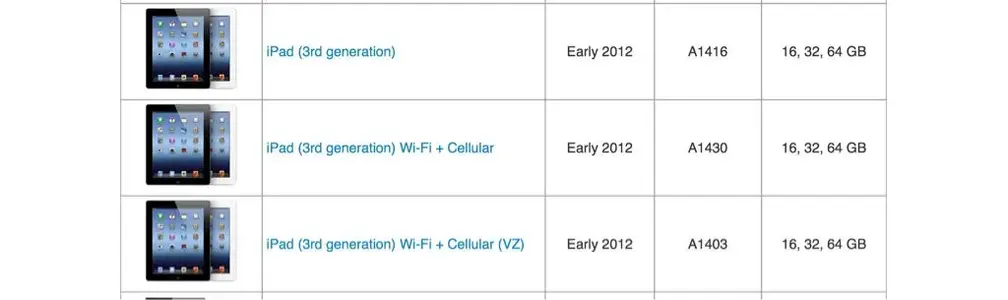
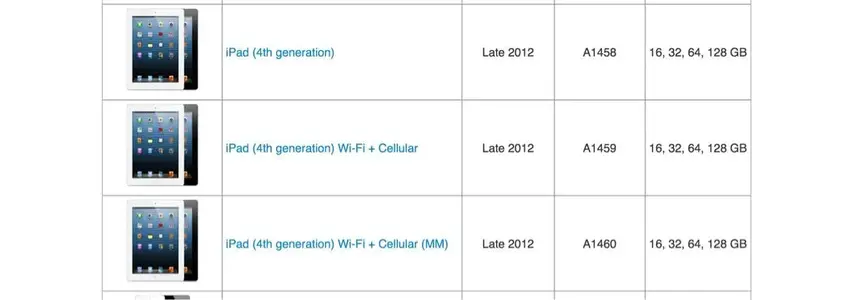
Are you certain that it's an iPad 4? This feature isn't available for the iPad versions before 4.

Look at the model number of your iPad on the back cover. This will help you identify it:


image-3583110872.webp


image-69771815.webp

Apple Support

It's "A" and a four digit number.

An easier method to identify it: if you use a 30 pin adapter to charge it, it's an iPad 3. With a lightning adapter, it's an iPad 4.
 
Last edited:

Most reactions

Latest posts

Back
Top Bottom