What's new

Silver surfer newbie

Status
Not open for further replies.

romft

iPF Noob
Hi everyone,
Just a quick intro from a retired silver surfer!
Still adjusting to my ipad2 and finding my way around,
I look forward to getting some help (at times) from
the very knowing guys out there!,
One question springs to mind,is it advisable to
Run the battery down at times or keep it fully
charged.
Many thanks ----talk soon ----romft
 
Hi there and welcome.

You don't need to run your battery down as the old "memory effect" is no longer present in these modern batteries however, Apple advises running your battery down once a month purely for the purposes of re-calibrating your battery meter.

There is lots of good advice and info on here plus plenty of members all too willing to help with any problems.

Remember, search is your friend. If you can't find the answer you need and you post a question then give as much info as you can to help members help you i.e. iPad 1 or 2, iOS version and name of app if the problem is with a specific app........and please don't forget to read the rules http://www.ipadforums.net/forum-rules-help-info/2119-forum-rules-everybody-please-read.html

These are the hacking section rules for all you jail breakers (and would be jail breakers) http://www.ipadforums.net/ipad-hacking/2892-hacking-section-rules-please-read.html

We also have an app for this forum. The link to download the app is: Discussion Forum for iPad Users for iPhone, iPod touch, and iPad on the iTunes App Store

You can download the manual for your iPad here http://support.apple.com/manuals/ and in iBooks search for "iPad user guide for" and you will find free comprehensive manuals for both iOS 4 and 5.

If you have other Apple products or are interested in other Apple kit then why not join our sister forum too at http://www.appleforums.net/

The Archangel
 
I am also in the silver surfer age group. Welcome to our forums from Australia enjoy learn and share and most of all have fun.
 
Just joined but don't know how to bring up my posts. Would like to see if I got any replies

Still trying to find replies, usually go to subscribed, but went to silver surfer thread. See my post but no replies. How do I find them? No send arrow here
 
Last edited:
Hi ski monkey

See a reply from u asking if I got ur reply re: finding posts,but still haven't
When I'm reading a post could I see a reply by tapping their name?
Now if u answer me don't know how I'll find it..lol

Sent from my iPad using iPFt
 
BettiBz said:
Hi ski monkey

See a reply from u asking if I got ur reply re: finding posts,but still haven't
When I'm reading a post could I see a reply by tapping their name?
Now if u answer me don't know how I'll find it..lol

Sent from my iPad using iPFt

Hi Betti,

Hopefully you will see this.

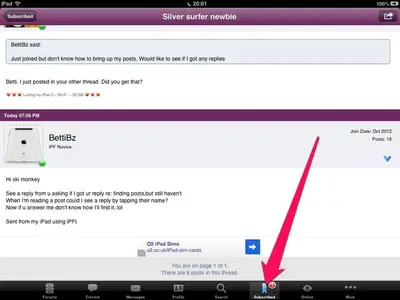
If you are using the IPF App which I think you are there is a subscribed tab at the bottom of the screen......

image-1309985545.webp

When you post in a thread or start a new thread you become automatically subscribed to that thread. When someone else replies the little red circle lights up on the tab to tell you (the number in the red circle is the number of threads with replies). Tap the tab then you can check your replies, the unread threads are highlighted in bold.

I hope that helps you but please let us know if you do need further help.

The Archangel
 
skimonkey said:
Betti. I just posted in your other thread. Did you get that?

No, don't know which thread I mean. Have been going thru several at subscribed, but cannot seem to send from there. I get Quote,Share,etc, but no SEND. How do u get it back and also back to home pagr?

Sent from my iPad using iPFt
 
Gabriel1 said:
Hi Betti,

Hopefully you will see this.

If you are using the IPF App which I think you are there is a subscribed tab at the bottom of the screen......

<img src="http://www.ipadforums.net/attachment.php?attachmentid=28675"/>

When you post in a thread or start a new thread you become automatically subscribed to that thread. When someone else replies the little red circle lights up on the tab to tell you (the number in the red circle is the number of threads with replies). Tap the tab then you can check your replies, the unread threads are highlighted in bold.

I hope that helps you but please let us know if you do need further help.

The Archangel

Got ur post but having trouble getting Send go thru. Am in subscribed thread

Sent from my iPad using iPFt
 
BettiBz said:
Which tab should I tap to see replies?

Hi Betti and welcome to the Forum!

When a reply comes in to a thread you have posted in you will see the notification on the Subscribed tab. Just press this and the thread will be highlighted on the right, just so you know which thread to select.

I noticed you had trouble with the Send tab also....I'm afraid our app has been acting up lately also....if the Send tab is not working just press your Return tab on your keyboard and you will then see the Send tab light up.

Hope his helps you....enjoy!
 
Hi,Leelal, I see u posted a reply to my post today but still don't know how to view it. Can I just tap on ur name to get it?
 
Status
Not open for further replies.

Most reactions

Latest posts

Back
Top