What's new

Problem with the position of the typing interface

JMKIRK

iPF Noob
Joined
Jan 7, 2014
Messages
2
Reaction score
0
Location
UK
Hi All. I've an iPad2. The other day the typing interface started displaying almost half way up the page and there were adverts below it. Today the adverts are gone but the typing interface is still displaying higher up the page (about 3 inches from the bottom when held in portrait).

Any insights would be greatly appreciated!
 
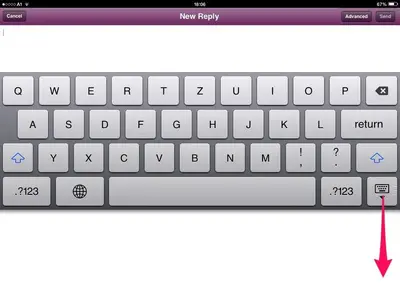
If it looks like this, hold the keyboard key and swiftly drag it towards the bottom:


image-820080630.webp

Welcome to iPF, btw! Glad you joined us!
 
Last edited:
Hi All. I've an iPad2. The other day the typing interface started displaying almost half way up the page and there were adverts below it. Today the adverts are gone but the typing interface is still displaying higher up the page (about 3 inches from the bottom when held in portrait). Any insights would be greatly appreciated!
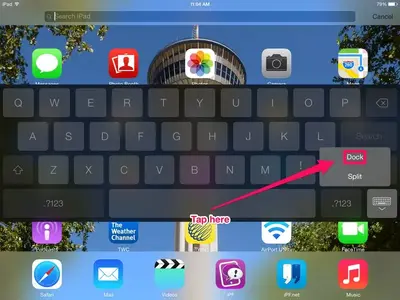
to bring the keyboard back to the bottom of the screen, tap and hold on the keyboard button at the bottom right of the keyboard. Slide your finger to the dock button, then lift your finger from the screen. Your keyboard will move to the bottom of the screen.

image-978380020.webp
 
Thank you all! It works!
Great group to have around.
Much appreciated.
 

Most reactions

Latest posts

Back
Top Bottom