What's new

No notifications

Vett

iPF Novice
Joined
Jul 28, 2013
Messages
144
Reaction score
30
Location
New york
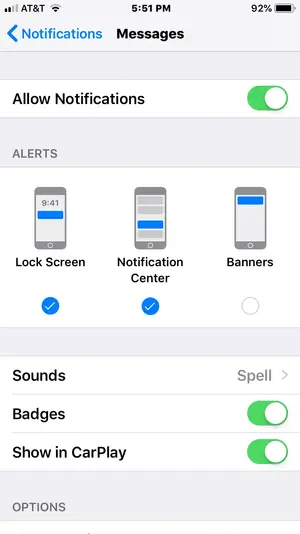
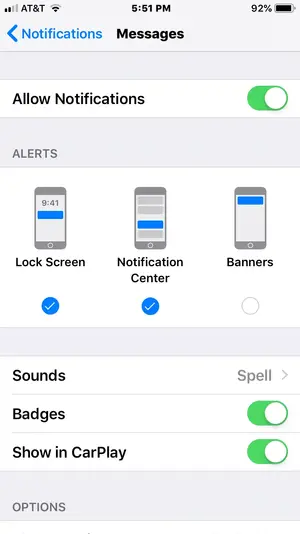
On my iPad 7 and iPhone I get no notifications when there is an incoming text or group text, any ideas
 
I have tried that it says allow notifications is on
 
This is what I did


QUOTE="Jupiter7, post: 1147280, member: 237936"]You need to go specifically to the Message settings in Notifications and check there.[/QUOTE]
 

Attachments

  • E2EAE67D-645F-4C1F-BF4E-685F93E9B41C.webp
    E2EAE67D-645F-4C1F-BF4E-685F93E9B41C.webp
    26.1 KB · Views: 423
  • 24CDD736-4C10-4942-91DB-3D88AECB8F35.webp
    24CDD736-4C10-4942-91DB-3D88AECB8F35.webp
    26.1 KB · Views: 394
Also check your settings in Settings > Sounds. Pay extra attention to the volume bar at the top. If you have Change with Buttons turned on, then ringer and other tones will go up and down with your phone’s volume. If off, the tones will always be at the level set by the slider.

 
This is what I did


QUOTE="Jupiter7, post: 1147280, member: 237936"]You need to go specifically to the Message settings in Notifications and check there.
[/QUOTE]
That is exactly what I have
 
Also check your settings in Settings > Sounds. Pay extra attention to the volume bar at the top. If you have Change with Buttons turned on, then ringer and other tones will go up and down with your phone’s volume. If off, the tones will always be at the level set by the slider.
I turned it off and see what happens
 
Just got a text still no Notification this is frustrating
 
Thanks for the help but I think I figured it out so far so good
 
Sure very simple
Open the text tap on the photo at the top, tap the info (I) and make sure "hide alerts" is off. I don't know why it was on in the first place but that seems to have taken care of it.
 

Most reactions

Latest posts

Back
Top Bottom