What's new

Icloud backup on ipad 2

fruitgum55

iPF Noob
Joined
Sep 4, 2013
Messages
9
Reaction score
0
Okay I had notice that I had not not backed up to icloud for two weeks .
I have done this via the settings this morning , I was under the impression this happened when ever you plugged in the tuned off iPad which I do nearly every night as a routine ,
If I plug in a iPad when the battery is flat does that also do a backup ? Is this where I have done wrong ?
 
It will start backing up, when your iPad is connected to Wi-Fi, locked (not turned off) and charging/plugged in. If one of these is missing, it won't backup.
 
Last edited:
You can also go into settings, iCloud and force a back up. I recommend to have it plugged it for that too.
 
Hello

Checked the iPad this morning and it has yet again not done a back up while plugged in over night , I looked up the procedure in the instructions for ios7 and found I had been doing the right sequence for the last 18 months , so I shall just gave to check settings each day and do a back up that way .

Any suggestions at all
 
Did you turn it off, or was it turned on while charging?
 
It was turned on and locked which is what I usually do unless the battery is flat .
 
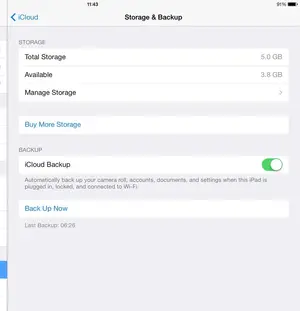
Look at your settings in iCloud: did you enable iCloud Backup there:


image-2415871000.webp
 
Oh yes I have done all that , it has always set up to automatically back up
 
Then try this:
Turn it off, wait for a few minutes and then on again.
Next option: delete the iCloud account and set it up again.
 
Thank you J A wizard

The iPad had been doing backups for he last week following turning off the iPad for an hour .
Thank you again
 
Glad to see that it works.
You're welcome. :-)
 

Most reactions

Latest posts

Back
Top Bottom