
What's new

Email text size problem

highstream

iPF Noob
Joined
Dec 30, 2021
Messages
14
Reaction score
7
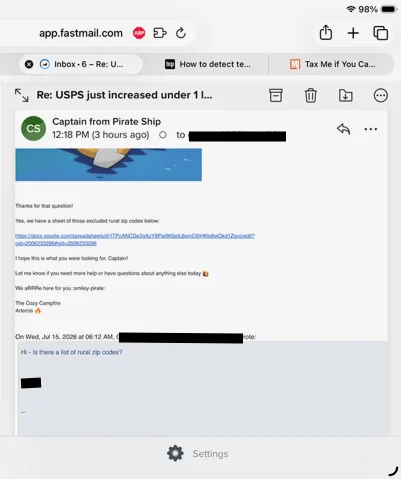
I have a Mini 5, iOS 26.5.2. Attached are a couple of emails I received from Pirateship.com. The first, normal text size, is a general notice they sent out, while the second is example of one of the replies from customer service to a question about the first, all the replies with unreadably small text. The shots are in Safari. Edge and Chrome, which I rarely use, show the same way, while FF is normal in both cases. The small text size is unusual in terms of the emails I receive, so I questioned Pirate Ship about it, wondering if they were coming from the same system, or same part of their system. Their IT dept says what I'm experiencing is "not widespread," and that I should look at my browser settings. Are there browser settings that could be causing this? Thanks,
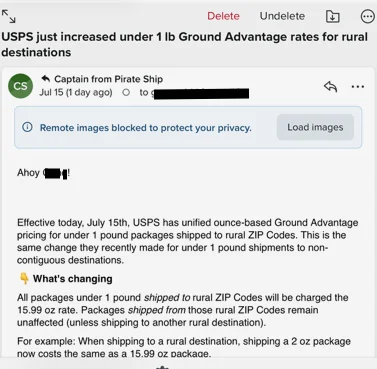


PirateShip - normal size edited.webp
PirateShip - very small text edited.webp
 
Last edited:
They are assuming that you are viewing your email in a browser. Which, to be fair, a lot of people do these days. Some email clients, like Gmail are just browsers wrapped up as an app.

The second email is likely in HTML format, and the font size is controlled by the email content. It overrides the font size in the Mail app, which has no font settings of it's own, Rather it uses the system font settings.

Most HTML emails look just fine in Mail. Advertising and newsletter style emails are almost always HTML. In my experience emails like this almost always come from Microsoft Outlook. The user chooses to send as HTML, never realizing they are dictating the exact appearance to the recipient, and not taking into account that not everyone has great vision.

I don't have a solution for you, other than pinch to zoom when reading, or you can copy/paste it into a note. It happens rarely enough for me that I've never tried to find a better solution.
 
Thanks. I'm not sure if I'm viewing my email (Fastmail) in a browser (I prefer browser version of programs, when possible). I have Safari open and Fastmail is a tab in it, but up top it shows app.fastmail.com. Here's a broader picture:

PirateShip - very small text edited.webp
 
Ok, I didn't notice you were in a browser.

I'm not seeing it in your screenshot, but there is normally an icon just to the left of the url.

1784356719231.webp


Tap on that and you should see an option to change the font size or zoom in the page. Depends on what version of iOS you are using. In some older versions the option may be in other places, so tap around. Also, tap-and hold can give other options for some icons.

Extensions are also a possibility. They are managed under the puzzle piece icon. There used to be one for changing the font size on a site, but I can't seem to find it anymore.
 

Most reactions

Latest posts

Back
Top