What's new

3G or WIFI? Which of the two is working right now?

maxatma

iPF Noob
It may seem a very silly question, yet it is very important to me. If I have 3G data activated on my Ipad2 and a wifi network at home, how do I know that my Ipad2 right now is surfing the internet through wifi and not through 3G? You see, I have a very limited 3G data plan and unlimited Wifi data plan, so it is vitally important for me to find out the answer.
P.S. I have both 3G and WIFI written on my status bar, so I really don't know which of them is working right now...
 
Last edited by a moderator:
By design the iPad should connect to WiFi before 3G if available. I know mine connects to my WiFi net at home only. You should also see the WiFi arches at the top if the screen, left corner and not "3G".
 
By design the iPad should connect to WiFi before 3G if available. I know mine connects to my WiFi net at home only. You should also see the WiFi arches at the top if the screen, left corner and not "3G".
The thing is that I have both WIFI arches and Utel 3G (my network) written on top of the screen...
 
DefBref, thank you, now it is more or less clear to me.
Still, every other piece of advice would be appreciated to ensure 100% it is not using my limited 3G while it is connected to my unlimited wifi))
 
I have t-mobile 3G iPad 2 and even tho it says T-mobile at the top, right next to it is the signal to wifi, now if I turn wifi off it then says T-mobile 3G, so if wifi is turned on it will use wifi first if there is wifi in range. I hope that helps
 
maxatma said:
DefBref, thank you, now it is more or less clear to me.
Still, every other piece of advice would be appreciated to ensure 100% it is not using my limited 3G while it is connected to my unlimited wifi))

As mentioned above, the WiFi arches should appear instead of 3G when connection to WiFi. Your IPad should also ask or mention available wifi signals first.
 
DefBref, thank you, now it is more or less clear to me.
Still, every other piece of advice would be appreciated to ensure 100% it is not using my limited 3G while it is connected to my unlimited wifi))
Why not just turn off Cellular Data in Settings when you’re using wifi? 100% sure you won't be using it if it's turned off.
 
Your 3G data won't be used when you are connected to a wifi network... No need to mess with settings. As long as you have a wifi connection, it will be used over anything else, even to the point of failing to connect to anything if your wifi router is not connected to the outside world...
 
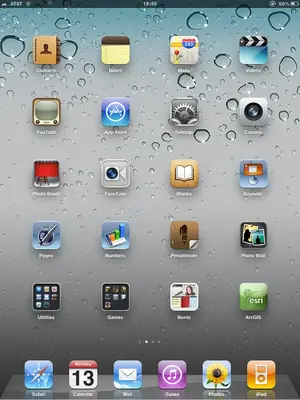
Look at the attachment. I have an AT&T 3G iPad 2. You will see AT&T and WiFi arches. No 3G.
 

Attachments

  • image-3745474128.webp
    image-3745474128.webp
    46.6 KB · Views: 843
maxatma said:
It may seem a very silly question, yet it is very important to me. If I have 3G data activated on my Ipad2 and a wifi network at home, how do I know that my Ipad2 right now is surfing the internet through wifi and not through 3G? You see, I have a very limited 3G data plan and unlimited Wifi data plan, so it is vitally important for me to find out the answer.
P.S. I have both 3G and WIFI written on my status bar, so I really don't know which of them is working right now...

What if u put it in Airplane Mode? Wudnt that turn off 3G using wifi by default?
 
What if u put it in Airplane Mode? Wudnt that turn off 3G using wifi by default?

Well yes, but the point is, he would like to actually use his wifi.

I concur with f4780y, if you have BOTH on and you are connected to a wireless network, then data is being accessed from wifi. Mobile phones and iPads are designed to prioritize wifi networks over 3G by default, so no worries!

There is the option to do the opposite, but I don't see why anyone should eat away at their 3G data plan! :p
 
With Airplane mode on you can then switch wifi back on, which is how I operate at home, decreases all extraneous draws on the battery as well.
By the way, when I checked out your attached screen shot, you only had a minimum wifi connection, additionally, I got confused for a second, as I couldn't remember putting all those apps on my iPad!
Very realistic aren't they?
 
3G or Wifi

I had one and got rid of it. This is very simple. When you are working in an area that has wifi and you do NOT want to use 3G. Go to Settings, Airplane Mode, On. Turning airplane mode ON is the same as doing it for your phone when you are on a plane. This turns off your 3G or subscribed to data plan. Then - go to Settings, Wifi, On, then check the network you want to connect to.
I did this and it worked great for me. So 3G = Airplane Mode OFF and Wifi Off
Wifi and no 3G = Airplane Mode On, Wifi On
 

Most reactions

Latest posts

Back
Top