conniepiano
iPF Noob
Hello there, I am new to this forum and have a question. Does anyone know how to download or transfer a pdf file to good reader that has already been downloaded into the library?
Thanks,
conniepiano
Thanks,
conniepiano
You can download the free iBooks app and transfer them using iTunes to iBooks.
You can mail PDFs to yourself and using the built in iPad email app you can use OPEN IN and send them to iBooks or GoodReader.
Does anyone know how to download or transfer a pdf file to good reader that has already been downloaded into the library?
Thanks,
conniepiano
DontUnderstandMyIpad said:.... Therefore there is no direct way to open a PDF from iBooks in another app....
DontUnderstandMyIpad said:iBooks has very limited export functionality and is missing the Open In... feature. Therefore there is no direct way to open a PDF from iBooks in another app.
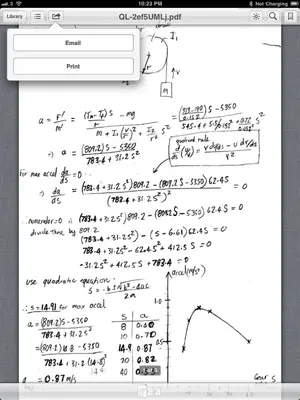
On work-around would be to open the PDF in iBooks, tap once to activate the controls, then sent it as an email to yourself and finally from Mail open it in the app of your choice.
Image for exporting instructions:
iBooks has very limited export functionality and is missing the Open In... feature. Therefore there is no direct way to open a PDF from iBooks in another app.
On work-around would be to open the PDF in iBooks, tap once to activate the controls, then sent it as an email to yourself and finally from Mail open it in the app of your choice.
Image for exporting instructions:
only 17 true Android tablet applications exist today compared to Apple's 65,000 tablet apps!
When I tap once on the ibooks pdf and then tap the move to arrow or what ever you call it, ONLY the Print option comes up, no option to email the pdf from ibooks. Is there a setting I've missed?
Thanks.
Jack