What's new

Screenshot background on ios26

Iguana1

iPF Noob
Joined
Oct 22, 2025
Messages
3
Reaction score
2
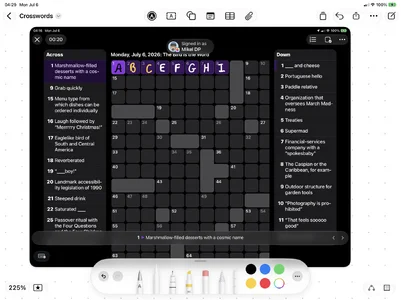
Upgraded to ios26 and the background to screenshots on an iPadPro has turned black (not the actual screenshot … the background to the app.). This means the pen menu dropdown, which also has a black background, is almost impossible to see. Is there a fix?
Cheers.
 
Upgraded to ios26 and the background to screenshots on an iPadPro has turned black (not the actual screenshot … the background to the app.). This means the pen menu dropdown, which also has a black background, is almost impossible to see. Is there a fix?
Cheers.
I have been looking for a fix for this. One way I have discovered just now is to actually choose a colour for one or two of the tools. At least that way they stand out better against black background.
 
I have been looking for a fix for this. One way I have discovered just now is to actually choose a colour for one or two of the tools. At least that way they stand out better against black background.
(Sorry to be so long in reply) Thanks for trying ... it is quite annoying as I use this everyday to copy puzzles from the newspaper and then fill in with screenshot pen... works great.
 
Instead of doing the crossword directly in Screenshot, you could save it to another app and do the crossword there. Freeform would probably work best. You can resize the puzzle there, and even keep multiple puzzles on the same board. A record of you past victories, if you will.

Notes will also work, if not as flexible in how the puzzle is presented.

Also, the tool background is a bit better in the iPadOS 27 Developer Beta. Along with the Liquid Glass adjustments possible you might find it more palatable (pun intended). Something to lookk forward to when you update.

 

Attachments

  • 1783337393418.webp
    1783337393418.webp
    114.9 KB · Views: 17
Instead of doing the crossword directly in Screenshot, you could save it to another app and do the crossword there. Freeform would probably work best. You can resize the puzzle there, and even keep multiple puzzles on the same board. A record of you past victories, if you will.

Notes will also work, if not as flexible in how the puzzle is presented.

Also, the tool background is a bit better in the iPadOS 27 Developer Beta. Along with the Liquid Glass adjustments possible you might find it more palatable (pun intended). Something to lookk forward to when you update.
Thanks twerppoet, I will have a look at alternative aps. I guess it is really the convenience of 'one click' to screenshot ... or perhaps I need a new pair of glasses! Cheers.
 
One action. Got it.

Here is a shortcut. Add it to your Control Center as a Shortcut.

When you chose it from the Control Center it:
1. Closes the Control Center
2. Takes a Screenshot
3. Opens the ScreenShot in Preview.

Preview uses pretty much the same markup tools.

After playing with the FreeForm option for a while, I decided Preview works better for this.


Let me know if this works, or if you need help adding it to Control Center. I'm running the Developer Beta, so there could be incompatibility issues.
 

Most reactions

Latest posts

Back
Top