What's new

Samsung Wireless Printer

I_luv_Apple

iPF Novice
Joined
Mar 27, 2011
Messages
328
Reaction score
6
Location
London
I've checked all the threads and can't find a response that's applicable to my problem, please help. I have a Samsung Wireless laser printer that states that you can print direct from your iPad and phone if you download the Samsung print app. This printer is not AirPrint Compatible as far as Im aware (are laser printers compatible with AirPrint?). I've spent nearly all night trying to find my printer on the Samsung app but it cannot connect. What I find strange though is the fact that my printer can wireless print off the iMac easily but not the iPad or iPhone. Can anyone recommend a solution to my problem? Will I need to buy an airport device? I've looked at a few apps but I am not sure how my documents get to the app to print. Any help will be gladly appreciated thank you xx appreciated. Thank you xxx

Any
 
AirPrint is not required here since you are using an app.

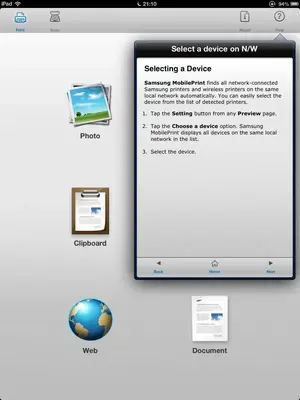
First thing is that both the printer and iPad must be on the same wifi network at your house. Can you confirm that? The app should have a means of scanning your network to find the printer. Did you ask it to scan the network to look for your printer?
 
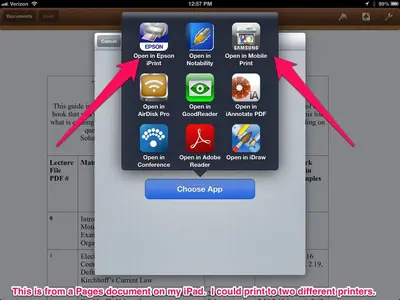
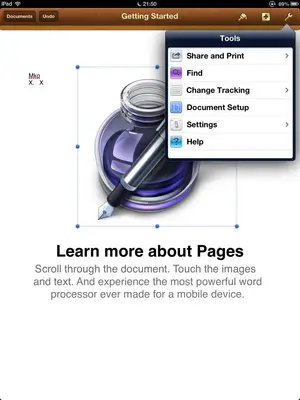
Once you get the app to see your printer, then to print a document you will need to use the open in functionality with your app to send the doc to the Samsung app. Note the pic.
 

Attachments

  • image-1413853608.webp
    image-1413853608.webp
    56.4 KB · Views: 1,228
Last edited:
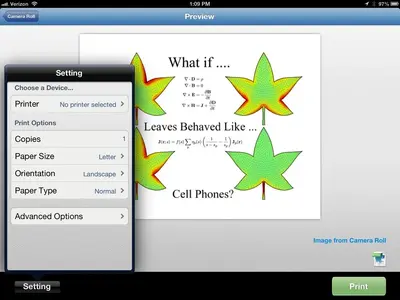
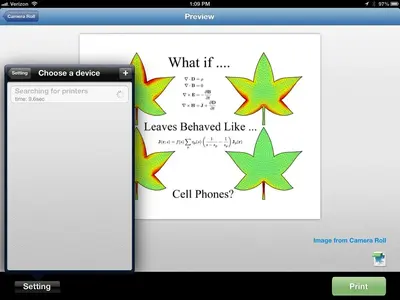
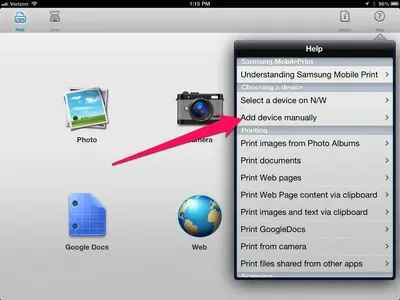
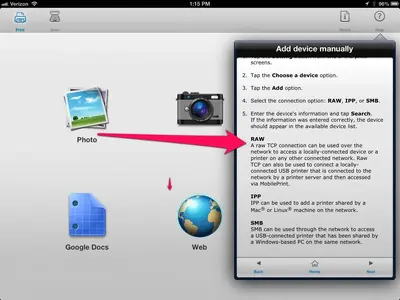
That app appears to be quite full featured and is replete with help screens. The problem is likely that it can't be found on the network. Is your printer in the list that is listed in the page in the AppStore? You might need to try to add it manually using instructions given in the help.
 

Attachments

  • image-4021283319.webp
    image-4021283319.webp
    46.2 KB · Views: 742
  • image-472733299.webp
    image-472733299.webp
    39.7 KB · Views: 798
  • image-1711023104.webp
    image-1711023104.webp
    57.8 KB · Views: 678
  • image-2624419727.webp
    image-2624419727.webp
    62.6 KB · Views: 792
Last edited:
AQ_OC said:
AirPrint is not required here since you are using an app.

First thing is that both the printer and iPad must be on the same wifi network at your house. Can you confirm that? The app should have a means of scanning your network to find the printer. Did you ask it to scan the network to look for your printer?

Hi thank you for the response. I can confirm that they are on the same network and that I requested it to find the network but it does not seem to find it, even when I'm sat right next to it.
 
Thank you for the photos! I'm going to try it now and let you know how I get on.
 
Can you see the printer from your PC/Mac as a networked device? Do you have more than one PC/laptop and can you see it on all of them?
 
It states to select a device but doesn't tell you how or where?
 

Attachments

  • image-2874195634.webp
    image-2874195634.webp
    25.6 KB · Views: 747
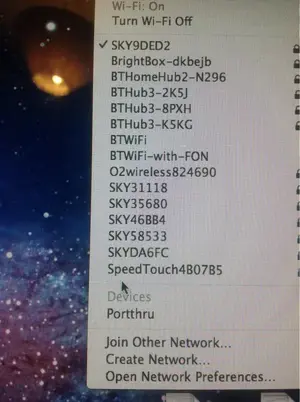
Ok I've just released that the printer may be called Porttrhu but still not sure how to add it to the iPad.
 

Attachments

  • image-2953710016.webp
    image-2953710016.webp
    69.8 KB · Views: 665
Ok I've just released that the printer may be called Porttrhu but still not sure how to add it to the iPad.

Did this list come up as a result of the menu you showed in the previous post? What OS is this?
 
No this list came up on my iMac. Nothing comes up on the iPad other than the wireless list. It's iOS 10.8.2
 
Can you get in Finder then go over to Go and then select Network. Then, get a screen shot of what's on your network. Your printer should be in that list...
 
This is e options from my iPad
 

Attachments

  • image-2068380691.webp
    image-2068380691.webp
    30.8 KB · Views: 443
AQ_OC said:
Can you get in Finder then go over to Go and then select Network. Then, get a screen shot of what's on your network. Your printer should be in that list...

On the iPad or the iMac?
 

Most reactions

Latest posts

Back
Top Bottom