What's new

New member to forum! Love dragonvale!

Welcome to our forum! We hope you enjoy your time with us. If you have any questions, the Search feature will be your best friend. If that doesn't work, just wait someone will be around with the answers you seek. With over 200,000 members I'm sure someone will be able to help you.

I saw your post in the DV forum. Glad you found it!

While you're *looking around *here are a few links you may find useful.

We have an iPad manual available for download incase you ever need it.
Apple - Support - Manuals

Did you know we have our own App - Its pretty easy to use.
http://itunes.apple.com/us/app/discussion-forum-for-ipad/id412896524?mt=8

We also have a gaming section. There is bound to be something there you like.
iPad Games
iPad Game Specific

Last but not least. Everyone has to play by the rules here. Please read them and keep them in mind when you post. http://www.ipadforums.net/forum-rules-help-info/2119-forum-rules-everybody-please-read.html

Again Welcome and We hope you Enjoy Your Time Here!

Fleur*
 
I look at it with one eye closed! I'm torn between knowing and discovering! But I'm here! So what's that tell ya?! :-)
 
leelai said:
You're welcome....it's a mighty long read but you'll get oodles of tips from it. Make yourself comfortable!

iPad 2 3G 64gb

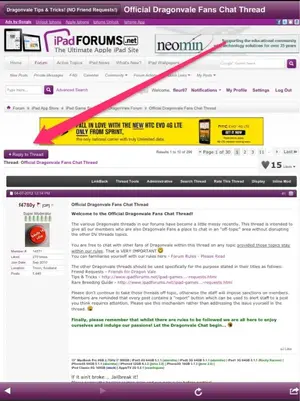
I'm finding the "reply" button, but how do I start a new question on the chat page? Thx!
 
image-998623376.webp

You click on the reply to thread tab. It's the top left side of the page.

Here is a link to help as well http://www.ipadforums.net/new-membe...-creating-posts-starting-new-threads-how.html
 
Last edited:
fleur07 said:
<img src="http://www.ipadforums.net/attachment.php?attachmentid=19176"/>

You click on the reply to thread tab. It's the top left side of the page.

Here is a link to help as well http://www.ipadforums.net/new-member-introductions-site-assistance/53410-creating-posts-starting-new-threads-how.html

But isn't "reply" to someone elses question (which i dont have the answer to) different than "how to" start my own, different question?

As u can see, I've got the "rely" to a Pre-existing thread down, but I want to start a new one about the fountain of youth.
 
You press the reply tab and then type in what you want... Have you read the link Gab and I gave you, everything you need is in there. For a new thread you press the new thread tab, however to post inside the chat thread just use the reply to thread tab.

 
Last edited:

Most reactions

Latest posts

Back
Top