What's new

Lost clicks

Blondey

iPF Noob
I had this problem before and with the help of the forum sorted it out. I have lost me clicks...keyboard, lid closing, sound when plugged into charge, etc. etc. last time it was the mute was on. This time I haven't a clue. Tried the usual, the little button at the side of the sound button governs orientation (hope that's what it us called) nothing seems to be working. Inspiration needed please. Thank you
 
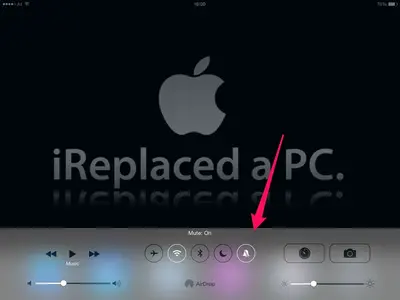
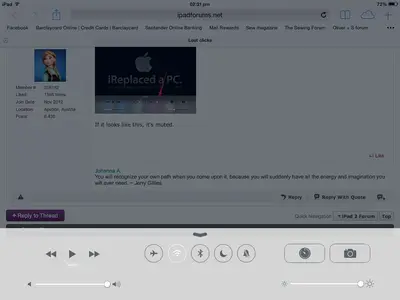
If you have iOS 7 installed, open the Control Center and look at this button:


image-2280995063.webp

If it looks like this, it's muted.
 
No it looks like this, black bell with a slash through it, it says 'mute off'

image.webp
 

Attachments

  • image.webp
    image.webp
    27.1 KB · Views: 253
Last edited:
Have u got the sound button down to mute,very easy to do it, the button that also locks the orientation. Landscape portrait, have done this lots of times , duh, and still go wheres the sound got too. Just tried it and found out when turning the sound down with that button if you hold it down it jumps right down to mute.
 
Last edited:
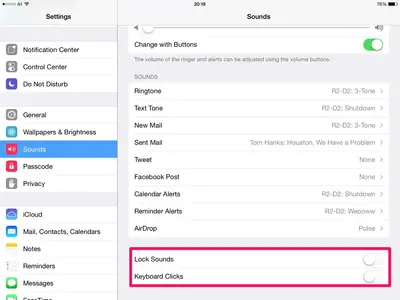
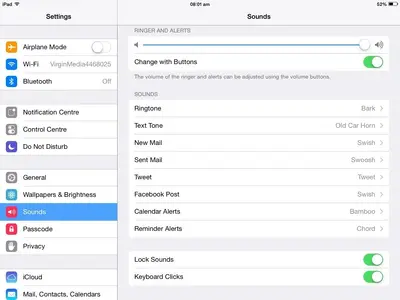
Look at Settings - Sounds, here:


image-2954699495.webp

Mine are disabled, yours should be enabled, if you want to hear them. Also make sure "Change with Buttons" is enabled (same screenshot, top).
 
Last edited:
Try re-starting.

If you haven't got a clue, even before you 'try everything', this is the simplest and most effective solution. It's amazing how often it works. I usually just turn my iPad 2 off, wait about a minute, and turn it on again. Then take a bow for once again being an effective problem solver!

If that doesn't work - don't wanna hear about it. (Just kidding.)
 
If you haven't got a clue, even before you 'try everything', this is the simplest and most effective solution. It's amazing how often it works. I usually just turn my iPad 2 off, wait about a minute, and turn it on again. Then take a bow for once again being an effective problem solver! If that doesn't work - don't wanna hear about it. (Just kidding.)
I have music app that I really like BUT sometimes wont start. I think u have fixed it for me It has worked every time since I turned her completely off. THANKS
 
Press the Power button until you see "Slide to power off". Use this slider to turn off your device. It will need some time until it's completely turned off - a few seconds. During this period you will see a faint "wheel" running in the middle of your screen, before it's turned off completely. Then the screen will get completely black.

Wait for a few minutes until you turn it on again.
 
Last edited:
Just done it, for f***s sake how bl***y hard is it to find a click".......OMG, as God is my witness as I was typing this they have come back...what the chuff is that all about...I ask you. Thanks to all.
 

Most reactions

Latest posts

Back
Top