
What's new

WiFi Booster - Paid Tweak

f4780y

Super Moderator
Staff member
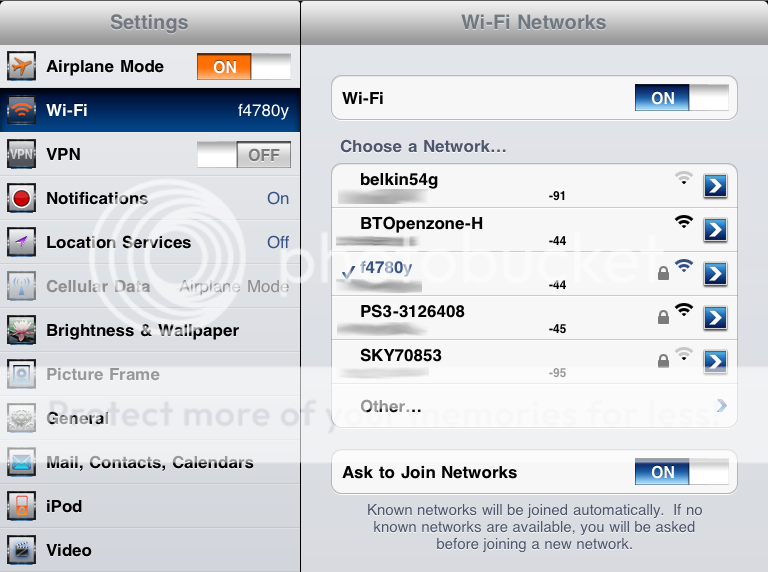
I purchased an excellent new tweak from Cydia this week. WiFi Booster from Malcolm Hall ($1.99) removes the signal strength limit allowing you to see and connect to weak WiFi networks in your area from the iPad WiFi Settings. It also enhances the network view to include the MAC address of the access point [blurred out in my image ;)] and the signal strength.

As you can see in the image below, I can now identify two weak networks which would normally be hidden without this tweak because they are outside of the iPad's original signal strength limit. Very handy since one happens to be an unsecured wireless router with an 8MB internet connection behind it :D
WiFiBooster.png


If you like your WiFi, look into this! It really works and has the f4780y seal of approval ;)
 
Last edited:
SweetPoison said:
Okay. So ~ in Cali blonde speak Marie words....:o

Why do I want this app?

I will let the iPad connect to wifi networks that are beyond apple's signal strength requirement. Do a simple test. Get a laptop, and see what networks you get. Go to iPad, you might pick up half, if you are lucky.
 
With my HPMini I don't get a very good wifi signal here at home. But on my iPad and my desktop I have lightening speed!

Why is that? So this app will fix that?
 
SweetPoison said:
With my HPMini I don't get a very good wifi signal here at home. But on my iPad and my desktop I have lightening speed!

Why is that? So this app will fix that?

It won't fix your hp! It's an IPAD app not an hp app. :D
 
SweetPoison said:
With my HPMini I don't get a very good wifi signal here at home. But on my iPad and my desktop I have lightening speed!

Why is that? So this app will fix that?

It won't fix your hp! It's an IPAD app not an hp app. :D

I know that, Brat! You referenced the laptop. For some reason. My iPad is hella fast already ~ why do I need it?

You are not speaking Marie, Grayson.:(
 
SweetPoison said:
I know that, Brat! You referenced the laptop. For some reason. My iPad is hella fast already ~ why do I need it?

You are not speaking Marie, Grayson.:(

It has nothing to do with speed, just range.
 
SweetPoison said:
I know that, Brat! You referenced the laptop. For some reason. My iPad is hella fast already ~ why do I need it?

You are not speaking Marie, Grayson.:(

It has nothing to do with speed, just range.

Apple limits the iPad to only show networks that have a certain signal strength. This tweak removes that.

Cool. Simple explanations.:D. Tell me ~ why do I want it removed?
 
So you can connect to networks that are outside apple's range. So iPad can get networks that only laptops can.
 
Does it still work fine or are the networks that get hidden too slow to use anyway?

Well, define "work fine". WiFi performance depends on the signal strength amongst other things. If you are connected to a very weak network you will likely be on the edge and can't expect great performance. But if you are in a bind, or want to be able to see everything in range (perhaps so you can move closer to get a stronger signal) it is a valuable tweak, to me at least. YMMV.
 
Last edited:

Most reactions

Latest posts

Back
Top