What's new

Spreadsheets and iPads

mdholm

iPF Noob
Joined
Mar 2, 2012
Messages
263
Reaction score
10
Location
United States
I have a spreadsheet on my Thinkpad computer and and iPad3 with the Numbers app. How do I get the spreadsheet onto my iPad, and in the Numbers app where I can use it? My brother says, "just email it to yourself" which doesn't quite tell me how to do this. I feel like he left out a step; it can't be that easy, can it? What happens after I email it?

Thanks!
 
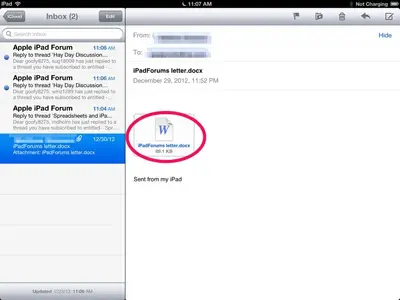
Perhaps you could email the document to your own email address (attach it to an email) and then, on your iPad, open the email, hold down on the document icon, and select "Open in Numbers."

Hope this helps.
 
I have a spreadsheet on my Thinkpad computer and and iPad3 with the Numbers app. How do I get the spreadsheet onto my iPad, and in the Numbers app where I can use it? My brother says, "just email it to yourself" which doesn't quite tell me how to do this. I feel like he left out a step; it can't be that easy, can it? What happens after I email it?

Thanks!

Is this in Excel format ?

If so then your brother is right. Email it to your iPad then tap on the file in your email message. It should open in Numbers as presumably this is the default app to open spreadsheets.

Alternatively if you use iCloud you can send it there and open it directly in Numbers. I think you might also be able to use Dropbox, but I am not too sure about the integration in Numbers.

Sent from my iPad using iPF
 
Document icon:


image-1376162614.webp

Hold down on it and select Numbers.
 
Thanks, that worked! Now, how do I add info? When I click on a cell I get cut, copy, paste, delete, and fill. Fill causes a yellow box to surround the cell. How do I get a keyboard to open up?
 
Thanks, that worked! Now, how do I add info? When I click on a cell I get cut, copy, paste, delete, and fill. Fill causes a yellow box to surround the cell. How do I get a keyboard to open up?
You have to double tap the cell to invoke the keyboard.
 
Thanks, that worked! Now, how do I add info? When I click on a cell I get cut, copy, paste, delete, and fill. Fill causes a yellow box to surround the cell. How do I get a keyboard to open up?

Try reading this web page http://www.apple.com/uk/support/ios/numbers/

It has some hints and tips and trouble shooting info and online help file.

Sent from my iPad using iPF
 
Last edited:

Most reactions

Latest posts

Back
Top Bottom