What's new

Notes

dnpsmith

iPF Noob
Joined
Aug 29, 2013
Messages
8
Reaction score
0
Location
Spring Hill, FL
Whenever I write notes and then close, the title of the note moves over to the left where a list of notes are kept.
But when I leave to go back to the home page and then return to the Note icon the list of notes are gone.
How can I permanently keep them? This has happened all the time.
Thanks
 
They shouldn't disappear. Which account do you use for your notes?
Also: are more than one account enabled for notes?
 
Look at your Gmail email account. If there's a folder named "Notes", then your notes move to the Mail app after you entered them.
 
Another idea:
If you set up iCloud on your device, there may be more than one account on your iPad set up using the Notes app.
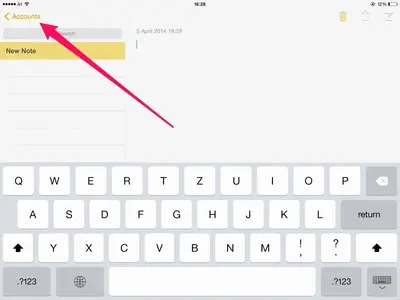
If you see "Accounts" when you open the Notes app:


image-746883977.webp

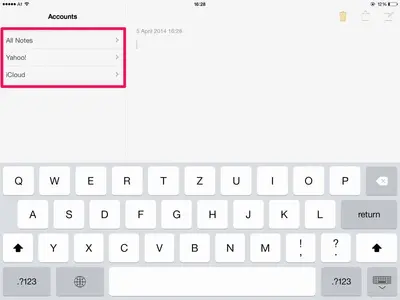
Then tap it to look at the accounts that are using the app:


image-3195366949.webp
 
I think I have the problem solved. When I wrote a note I immediately returned to home page.
What I didn't do was tap the title on the left column to save it.
Anyway I think that is the way to retain the notes.
Thanks, Johanna, for your replies.
Richard
 
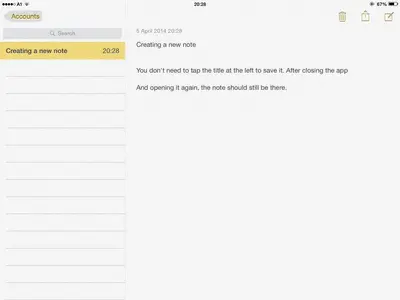
Tapping the title shouldn't be necessary. I just created a note in the app and closed the app (pinch to close). Even after a minute, the note was still there.
 

Attachments

  • image-1986089613.webp
    image-1986089613.webp
    24.6 KB · Views: 258
I think I have the problem solved. When I wrote a note I immediately returned to home page. What I didn't do was tap the title on the left column to save it. Anyway I think that is the way to retain the notes. Thanks, Johanna, for your replies. Richard

As JA has said there's no need to tap the title to save a note, this should happen automatically.

Have a look in Setings - Mail, Contacts, Calendar and select your gmail account and make sure your Notes are turned on here.
 

Most reactions

Latest posts

Back
Top Bottom