Callihan_44
iPF Noob
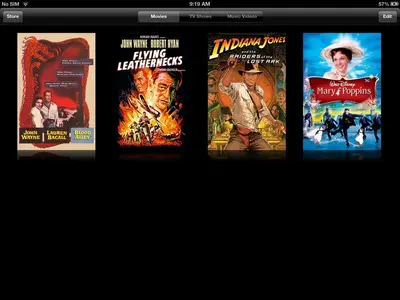
Am I crazy but didn't movies have a label below icon?
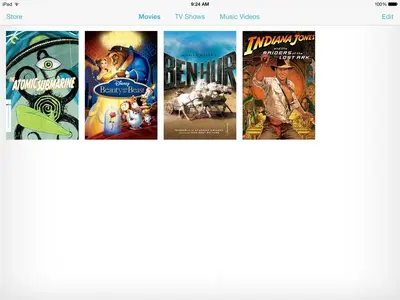
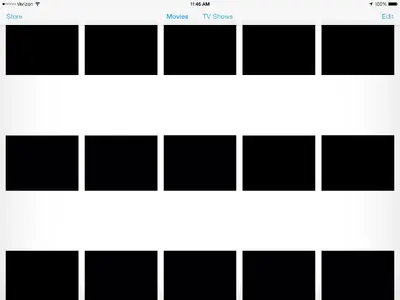
There were no movie labels in iOS 6.1.3 either, just the poster art as in iOS 7.IOS7 MOVIE LABELS MISSING!!!!!!!!!! incredibly serious problem for me. Glad I downloaded ios7 on my personal iPad first. At work this would have wiped us out with orientation videos we use on iPads - many hundreds on each ipad. Having no labels would make our entire multiple iPad investment useless until they fix this. Quite surprised, never had this kind of serious problem with an upgrade before. It seems seriously amateur hour, just like the clown makeup interface I'm struggling to try to like. I am a really integrated Apple user and I'm wanting to like this but a mistake like this that wipes out the entire purpose of our many iPads if anyone upgrades one of our work ipads by mistake is pretty disappointing. I'm really feeling the absence of Steve's oversight. They never got anything this wrong before. The crazy thing is that if you shut down the video application and restart it you can see all of the video names for a moment and then they are all replaced by a clip of the movie - in my case, virtually all black screen stupidly selected. Strange that they like this crazy clown paint look but don't bother to detect that they've got a screen from the movie where there is at least some color. Now I'm only going to have to suffer on my personal iPad. Of course now that I no longer watch TV but instead download entire seasons to my iPad for watching, I have four seasons of The Wire to try to dig through when I want to watch the next episode. I'm trying to delete each episode as I watch it, not something I normally do by choice as I sometimes like to go back to check things I realize I may have missed in a previous episode. Of course now I have fifty black squares with absolutely no information or label of any kind. And I get to try to hunt through that to figure out what video I'm dealing with. Serious bummer. Wish I hadn't upgraded yet. And if they don't choose to fix this??? I really am disappointed already. This is the main reason I have an iPad, actually.

iOS 6.1.3
iOS 7.0There were no movie labels in iOS 6.1.3 either, just the poster art as in iOS 7. View attachment 48123 iOS 6.1.3
View attachment 48124 iOS 7.0
That image is a screenshot direct from my ipad. How am I supposed to deal with hundreds of black squares? How can I hand an ipod to someone and tell them they can watch instructional videos when those videos have just lost every indication of what is on them? I have ipads with literally 900+ short videos on them. Without the labelling there is no way to know how to locate these carefully named, numbered, and alphabetized videos. And on my personal ipad I have seventy or eighty videos that change constantly as I finish watching them. These also include instructional videos. I'm actually quite surprised at this large a mistake. On the other hand, if this is some sort of choice to make using downloaded movies into an intentionally inconvenient experience it will be quite awful. What makes it seem like a glitch is that when the video application starts up all of the videos first show, for only an instant, with the names of the videos right in the space that then quickly turns to black squares. As someone who is already not at all a fan of the whole clown makeup craziness, I'll admit I'm ready to judge it badly. But overall, anything I deal with that substantially favors form or color or pizzaz - or clown makeup - over necessary functionality is not the kind of thing I like using or dealing with. Now the videos app is some sort of modern art statement. It's quite sickening, actually and it was the first thing I came across when I picked up the iPad to watch a movie after ios7 downloaded. The thing that really troubles me is that I can't image how they failed to catch this problem. it was the very first thing I noticed. Do they only provide the beta to developers? How could they not let a few hundred people test the basic functionality of ios7 before they release it like this? Don't Apple employees take this home so that such basic problems are caught before they get to us? This is the premier company in the world right now for this kind of product and this just plops out on release day? No one ever thought to see if non-Apple-purchased movies were usable on a viewing device like this? For me this unfortunately confirms the underlying crazy-yahoo quality I was fearing might be taking over Apple now that the cat has died and there doesn't appear to be such a coherent purpose any more. I am actually quite horrified by the overall look and the random colors that seem completely detached from any usefulness. Having such a glaring mistake show up on the first day is very disturbing and I wonder how long I'll have to wait for this to be fixed. Unless we are somehow now in a penalty phase of making downloaded or personally-produced videos very difficult to use. Surely that can't be it. And if it isn't - how did this happen?> clown makeup interface
LOL. Talk about an accurate 3-word description of the new look. I was looking for a verbal description of the new look and have found it. Well done! I suppose we will get use to it though eventually.
Hopefully there are some workarounds to the movie listings.
Can you explain why the new movies I created and added last night (created from Handbrake) were stored under a "Home Videos" tab (within the Videos application), instead of the "Movies" tab? These were created the same way as my other movies (i.e., Handbrake). Plus the new ones added under "Home Videos" show the picture icon and below each icon are two lines with the Title and Date of the video. This has the information needed but I don't know why these are being stored there. (Note that at the top of my Videos application I see three tabs: Movies, TV Shows, Home Videos).There were no movie labels in iOS 6.1.3 either, just the poster art as in iOS 7. View attachment 48123 iOS 6.1.3
View attachment 48124 iOS 7.0
I found this in another forum:
iOS 7 VIDEOS: No titles for movies - MacRumors Forums
Maybe helpful. I don't know as yet. I don't understand what they mean by "Change the Media Kind in the video options from "Movie" to "Home Video"". If you know and this does work, please inform me.
Thanks.