What's new

Mail Flag Colour

Willbert

iPF Novice
Joined
Oct 27, 2023
Messages
721
Reaction score
2,534
Location
UK
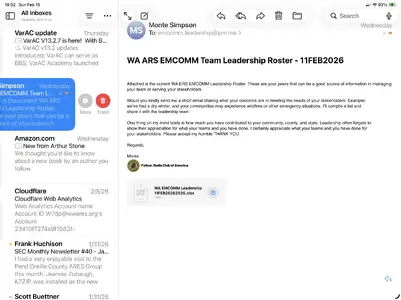
I seem to have lost the ability to change the colour of the flag in Mail under iOS 26. Anyone else have this issue. I know I changed it fairly recently for a couple of emails but now it’s stuck on that (blue) colour. All previous flagged emails retain the default orange.
 
I seem to have lost the ability to change the colour of the flag in Mail under iOS 26. Anyone else have this issue. I know I changed it fairly recently for a couple of emails but now it’s stuck on that (blue) colour. All previous flagged emails retain the default orange.
There’s a curved arrow bottom right of the mail page. Tap on it and you will see coloured flag options.
 
Thanks for that. I looked for this arrow yesterday and I couldn’t see it. Today it’s clearly there. I’ll keep a look out for this in case it happens again and take a screen shot.
 
I should add there have been a few glitches on my iPad A17 Mini since I upgraded to iOS 26. Quitting apps normally restores things but perhaps I should restart more often.
 
Another method, that doesn't mean scrolling to the bottom of longer messages.

Slide the email to the left, slowly, until you see some option. If you go to far you'll end up trashing the email. Not the end of the world, as you can always open the trash folder and get it back.

You should see a More option. Tap this and you'll get the expanded options, including the ability to choose the flag color.

If the flag color is already correct, you can just long press the email list and chose Mark, and then the submenu. This is also how you can mark and email as junk.

It is possible to change what options show up for a left and right slide on the email in Mail's settings under Swipe Options.
 

Attachments

  • IMG_0378.webp
    IMG_0378.webp
    192.6 KB · Views: 73

Most reactions

Latest posts

Back
Top Bottom