What's new

Deleting your own post

Kevin43

iPF Novice
Joined
May 28, 2012
Messages
283
Reaction score
4
Location
Boston
Hi

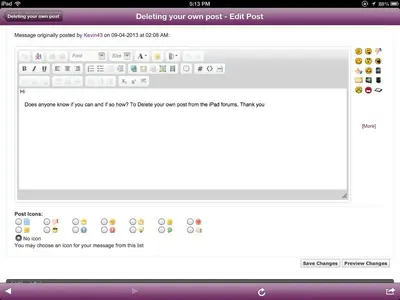
Does anyone know if you can and if so how? To Delete your own post from the iPad forums. Thank you
 
Last edited:
Hi Gabriel1

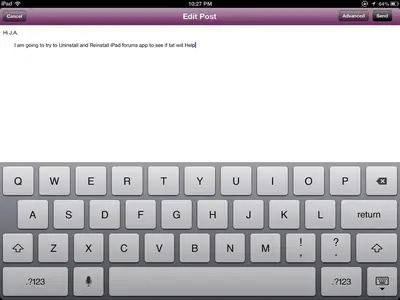
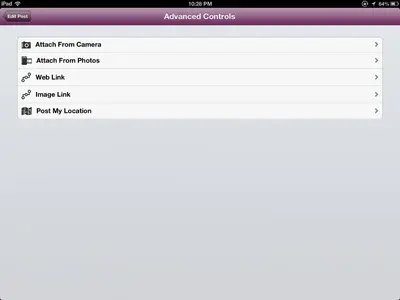
I Went into the Edit and Advanced but do not see Deleting your Own post Option in there. Thank you
 
Hi Gabriel1

I Went into the Edit and Advanced but do not see Deleting your Own post Option in there. Thank you

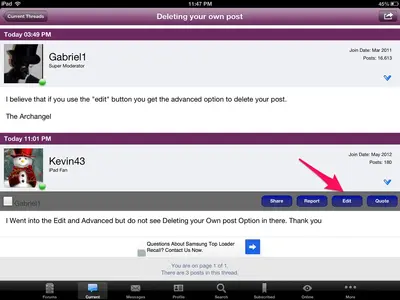
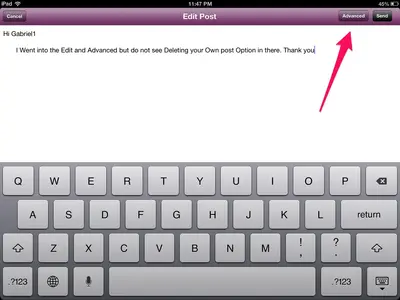
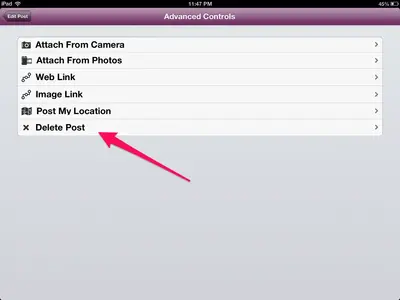
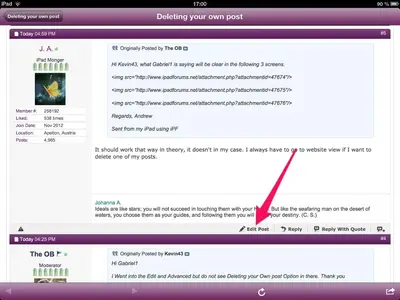
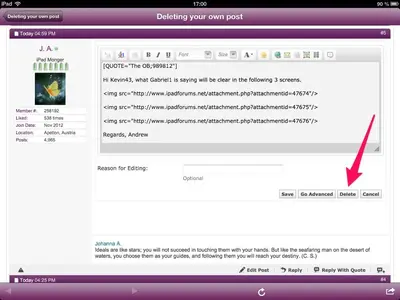
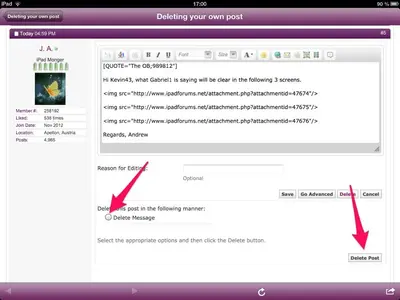
Hi Kevin43, what Gabriel1 is saying will be clear in the following 3 screens.


image-1211616897.webp


image-2590576138.webp


image-152850052.webp

Regards, Andrew

Sent from my iPad using iPF
 
Hi Kevin43, what Gabriel1 is saying will be clear in the following 3 screens.

<img src="http://www.ipadforums.net/attachment.php?attachmentid=47674"/>

<img src="http://www.ipadforums.net/attachment.php?attachmentid=47675"/>

<img src="http://www.ipadforums.net/attachment.php?attachmentid=47676"/>

Regards, Andrew

Sent from my iPad using iPF

It should work that way in theory, it doesn't in my case. I always have to go to website view if I want to delete one of my posts.
There it will look like this:


image-1626970169.webp


image-1752519700.webp


image-2461050345.webp
 
Last edited:
Hi J.A.

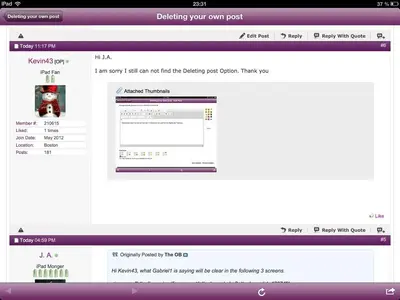
I am sorry I still can not find the Deleting post Option. Thank you
 

Attachments

  • image-3151770266.webp
    image-3151770266.webp
    20.9 KB · Views: 331
Your screenshot looks different than mine, not only because you can't delete your post.

On your screenshot, you should save changes. Then it should look like this:


image-3071069010.webp

You should have the possibility to edit your post.
 
Last edited:
Hi J.A.

I am sorry I am following all the steps of the Screenshots that you have Given to me but still can not find the Deleting post Option. Thank you for all help
 
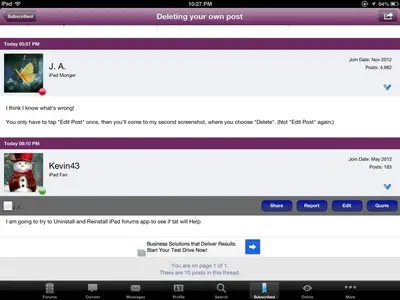
I think I know what's wrong!

You only have to tap "Edit Post" once, then you'll come to my second screenshot, where you choose "Delete". (Not "Edit Post" again.)
 
Last edited:
Hi J.A.

I am going to try to Uninstall and Reinstall iPad forums app to see if tat will Help
 
Hi

I am at a lost with this I have done all the Screenshot steps. I have Uninstall and Reinstall the iPad forums app and still can not do this. Thank you to Everyone for your help
 

Attachments

  • image-428825934.webp
    image-428825934.webp
    25.7 KB · Views: 329
  • image-2228902635.webp
    image-2228902635.webp
    18.3 KB · Views: 318
  • image-458324392.webp
    image-458324392.webp
    8.9 KB · Views: 335
I've never been able to delete a post from the iPad app.

In Safari it's tricky. After you choose the Edit then Delete buttons another box of controls appears just below. Before you click this second Delete Post button you need to check the Delete Message radio button under Delete this post in the following manner:

Hold in mind that some of the forum areas do not allow you to edit or delete your posts. The News section is one of these.
 
I've never been able to delete a post from the iPad app.

In Safari it's tricky. After you choose the Edit then Delete buttons another box of controls appears just below. Before you click this second Delete Post button you need to check the Delete Message radio button under Delete this post in the following manner:

Hold in mind that some of the forum areas do not allow you to edit or delete your posts. The News section is one of these.

So I'm not the only one who can't delete posts from the app.

My screenshots show what you're describing.
There's the possibility to delete posts in this forum. I've done it a few times.
 
Hi

I am at a lost with this I have done all the Screenshot steps. I have Uninstall and Reinstall the iPad forums app and still can not do this. Thank you to Everyone for your help


Did you change some of your iPF settings? In Safari or website view, next to your user name, tap "Settings", then scroll down to "General Settings" and look at them.
 

Most reactions

Latest posts

Back
Top