What's new

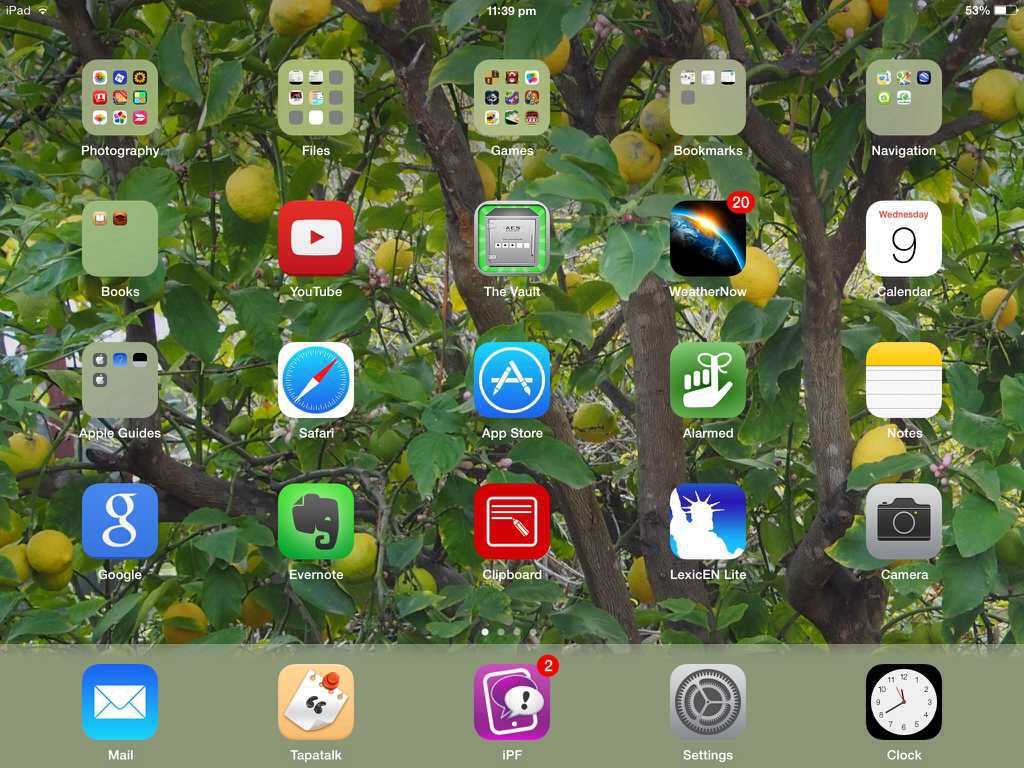
Are we stuck with the gray strip at the bottom of the home screen?

Or is it removable, changeable somehow? This OS7 is so bland looking.
That strip is the dock where you can park your most important apps. It can't be removed, but it does change colour based on the colouring of your wallpaper.
 
Thanks, that's what I thought. I'd prefer to park my apps without a background. Even cell phones have that option. Oh well.
 
Must admit, I have never noticed this. Only to say that I have the green aurora bolearis background. This seems to make my apps stand out better and softer on the eye. Probably a little bit of experimentation with the wallpaper and backgrounds would be beneficial. Besides, it is fun.
Mike
 
It stays pretty much a flat gray bar no matter what wallpaper I use. Geez, how hard would it have been to have an invisible option? Just another thing on my lists of dislikes for OS7. The list that continues to grow by the day.
 
It stays pretty much a flat gray bar no matter what wallpaper I use. Geez, how hard would it have been to have an invisible option? Just another thing on my lists of dislikes for OS7. The list that continues to grow by the day.

But grey's not a bad colour is it? Here's my wallpaper, with a somewhat scungy green bar, but it's not too bad, I think:)
3e7ybatu.jpg

The reason it's got that green tint is because the colour of the bar is an averaging mix of the wallpaper colours. Why don't you try out a predominantly blue or pink, whatever wallpaper? Just to see if you like that bar now? You may even remove that from your list of dislikes, d'you think?
I suppose that bar, of whatever colour, is to differentiate the permanent system apps from your downloaded apps.
Andrew


Sent from Oz using Tapatalk
 
Last edited:
It stays pretty much a flat gray bar no matter what wallpaper I use. Geez, how hard would it have been to have an invisible option? Just another thing on my lists of dislikes for OS7. The list that continues to grow by the day.
That's really sad if you cannot get the colour changed. This is puzzling as my 'aurora bolearis' wallpaper is excellent. Soft on the eye with a light green bar. BTW I am using iPad 3, Wi-Fi only, 32gb with IOS 7.0.2
I disliked the changes at first, principally because it was hard to find instructions which worked for me. It was difficult to understand some of the stuff but asking questions on here as always gave me good explanations and detailed instructions. I know this has not helped you re. the grey bar but I am sure someone on here will direct you. Have faith, I'm glad I have!
Mike
 
I tried the included grassy rolling hills wallpaper and it does change the bar to a light green. I guess the wp's I had been experimenting with were not brightly colored enough to cause a change. Now to get the rid of the bar entirely would be even better. I prefer to have some of my own artwork or other outdoorsy wildlife shots I've taken as my wallpaper. Having that wide bar at he bottom is just plain annoying. Another annoyance to get used to but not that big a deal I suppose. Now if I could get my KB to register my key presses correctly I'd be in hog heaven.
I appreciate your responses.
 
I get much better keyboard response with auto-correction turned off. Yes, I have to type a little more (capitalize that "I" for example) but that small inconvenience more than offsets the missed characters from a sluggish keyboard.

This post handcrafted from 100 percent post-consumer recycled electrons.
 
I get much better keyboard response with auto-correction turned off. Yes, I have to type a little more (capitalize that "I" for example) but that small inconvenience more than offsets the missed characters from a sluggish keyboard.

This post handcrafted from 100 percent post-consumer recycled electrons.
Thanks for the KB tip. I just tried a nice long email and it seems much more responsive.
 
Must admit, I have never noticed this. Only to say that I have the green aurora bolearis background. This seems to make my apps stand out better and softer on the eye. Probably a little bit of experimentation with the wallpaper and backgrounds would be beneficial. Besides, it is fun.
Mike

i have Aurora borealis as home screen too and used one of my macro shots for lock screen. The AB is very good behind app folders IMO. Tried a number before settling on this one. Used water drop for 4 years in both of ipads, 1 and 3 to keep relatively plain behind apps.
 
i have Aurora borealis as home screen too and used one of my macro shots for lock screen. The AB is very good behind app folders IMO. Tried a number before settling on this one. Used water drop for 4 years in both of ipads, 1 and 3 to keep relatively plain behind apps.
Good to know my old eyes aren't playing tricks! Nice to know you like it too, Diane. I also used to use the water droplets. Great minds eh? (or in my case not so great). :)
 
But grey's not a bad colour is it? Here's my wallpaper, with a somewhat scungy green bar, but it's not too bad, I think:)
3e7ybatu.jpg

The reason it's got that green tint is because the colour of the bar is an averaging mix of the wallpaper colours. Why don't you try out a predominantly blue or pink, whatever wallpaper? Just to see if you like that bar now? You may even remove that from your list of dislikes, d'you think?
I suppose that bar, of whatever colour, is to differentiate the permanent system apps from your downloaded apps.
Andrew

From my device this is completely untrue. I cannot get rid of the grey stripe on the bottom of my home screen on my iPhone 6S Plus. I had already set my wallpaper upon receiving my phone and it was fine -- there was no grey stripe at the bottom of my screen, everything was one color, which matched the black wallpaper. Then I went in and messed with my settings (God knows what) and when I returned to my home screen, the grey stripe was at the bottom of the screen and I've been unable to get rid of it ever since. I my old iPhone 4S, there was a setting for this and I can't remember what it is. Can somebody please help me get rid of the ugly grey stripe covering the icons at the bottom of my home screen??
Thanks, Allyson
 
Last edited by a moderator:
Wow, really old thread. After years of an IPad and IPhone I don't think about the gray strip except as the dock for most used or most important apps. Those old wallpapers aren't available any more or people use their own photos. Pick what you like, you can change it any time but the docking strip is there to stay.
 
While you can't get rid of the greyish dock at the bottom of the screen, you can make it effectively invisible by selecting a pure white wallpaper.
 

Most reactions

Latest posts

Back
Top