What's new

Why no automatic clock on ipad?

noddy

iPF Noob
As per title. I've just had to set my clock as it was 5 mins fast. Only just noticed in settings, there's no automatic option. Any reason why?
 
The time gets synchronized with your PC's time when you sync your iPad with iTunes. If your PC's time is off, your iPad will be off.

If you want to have the precise time on your iPad then you'll have to do an internet time syncronization right before you hook up your iPad. :)
 
Yes. I had this problem.
The iPad clock syncs to your pc's clock when you connect up. Just make sure your pc's clock is running on time and you'll be fine. I adjusted my pc's clock and all is dandy these days :)
 
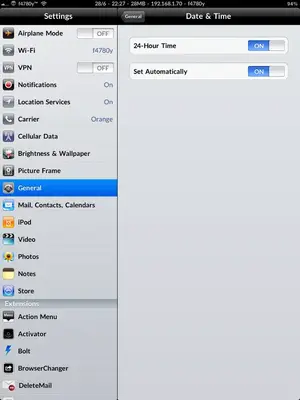
What am I failing to understand about this thread? I have an automatic setting...

EDIT - Sorry, I realise now, this is probably a 3G only option...
 

Attachments

  • image-3644285091.webp
    image-3644285091.webp
    19.8 KB · Views: 421
Last edited:
What am I failing to understand about this thread? I have an automatic setting...

We all do, but as soon as you connect to iTunes the time is synced to that instead and you must reset those auto settings.

As long as you sync those iPad settings are more or less redundant.
 
Last edited:
Really? OK. OP said he didn't, hence my question.
My time has always been bang on, no matter what. Never had to touch the settings at all. Go figure.
 
I never touched mine either. I never really noticed it, Leigh, except for a thread someone took out stating their clock was off. So I checked mine real quick and it was off by a few minutes, actually.

Never tripped about it since.:)
 
That's weird that there's an auto setting in the above pic. I haven't got that. Can't see why it would be 3G only when both connect to the Internet at some point.
 
If you have a cellular model, no problemo. Those of us with Wifi, though, the time can drift, sometimes quite badly. IOS4 will never pick up time using the internets, only by phone towers. Syncing with iTunes will only set the time if it is more than a few minutes off. To force iTunes to set the time, you may have to flip the device's time way off before syncing.

Mine loses almost 10 seconds a day, so it doesn't take long for it to be wrong enough to break Google's time-based authenticator (like an RSA badge). If you want to see how far off you are, get the free "Emerald Time" app.

 
Last edited:
What am I failing to understand about this thread? I have an automatic setting...

EDIT - Sorry, I realise now, this is probably a 3G only option...


I have it and I have wifi too.

Are you sure it's not something you picked up with a jailbreak app? Because as far as I know there is no auto setting on the Wi-Fi model. It's one of the things I really miss from my old 3G iPad 1.

Though I sync often enough that it is rarely off by more than a few seconds.
 
I also saw those previous threads and realised my iPad wifi would lose time if not synched to pc. I've just checked it again and it was fast by two minutes. I synched it to London UK time again. Will this be corrected in the future or will I have to keep correcting the time?

sent with love from my iPad on IPF
 

Most reactions

Latest posts

Back
Top