What's new

Storage space showing as used when it is not used.

Weehop

iPF Noob
Joined
Jun 1, 2012
Messages
43
Reaction score
0
Location
Washington State
When I started getting messages saying I was running low on resources, I checked usage in settings. Sure enough, it shows that I am down to 1.5 Gigs or so. So, I delete a bunch of apps and photos. Basically stripped it down. The thing is; I never had much to start with. I am not a gamer. I do have books, but not that much. I even dropped the only two magazine subscriptions I had. Bottom line...I still am showing only 1 Gig... I can see there are people with hundreds of apps and games, and such. I have no movies. What is the problem? What am I missing. This is very frustrating. I only have 28 apps. Is that too much?
 
Last edited:
When I started getting messages saying I was running low on resources, I checked usage in settings. Sure enough, it shows that I am down to 1.5 Gigs or so. So, I delete a bunch of apps and photos. Basically stripped it down. The thing is; I never had much to start with. I am not a gamer. I do have books, but not that much. I even dropped the only two magazine subscriptions I had. Bottom line...I still am showing only 1 Gig... I can see there are people with hundreds of apps and games, and such. I have no movies. What is the problem? What am I missing. This is very frustrating. I only have 28 apps. Is that too much?

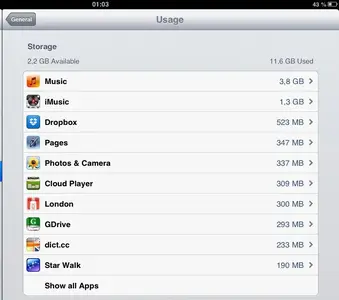
I have an iPad2 with 16 GB. There are 36 apps, and still 2.2 GB available.
You could go to Settings - General - Usage - Storage and look there what uses up the resources.
They're listed there, beginning with the ones that need the most space, down to those that need least.


image-261426294.webp
 
Last edited:
I just checked storage. I am not seeing any list of apps. What I am seeing is that little rotating thing that shows when something is loading. It never stops doing this, so a list of apps never shows. Any way to stop it and get it to load the list properly? This could be my problem. I have never seen a list there, ever. Hmmm.
 
I just checked storage. I am not seeing any list of apps. What I am seeing is that little rotating thing that shows when something is loading. It never stops doing this, so a list of apps never shows. Any way to stop it and get it to load the list properly? This could be my problem. I have never seen a list there, ever. Hmmm.

When I go there, it needs some time to reveal the apps, maybe 10 seconds. Perhaps you have to wait a little longer?
 
Well, finally...Got a list up! A first. I saw that the app Pinterest was over 4 Gigs. It's gone now. We will see how things go now.
 
The largest user on my iPad is the forums native app


Sent from my iPad using Tapatalk HD
 
Now I'm using my PC. I turned off the IPad, and when I went to turn it on again the apple icon popped up, and it froze right there. I have tried everything that I know of to get it to boot, but nada so far. I do not believe the battery is low, but I notice that when I plug it in there is no sound like it usually makes when I first plug it in to charge it.
The only change I made was the deletion of the Pinterest app. I have turned it on and off to death but nothing is working. Anything I can do?
 
Now I'm using my PC. I turned off the IPad, and when I went to turn it on again the apple icon popped up, and it froze right there. I have tried everything that I know of to get it to boot, but nada so far. I do not believe the battery is low, but I notice that when I plug it in there is no sound like it usually makes when I first plug it in to charge it.
The only change I made was the deletion of the Pinterest app. I have turned it on and off to death but nothing is working. Anything I can do?

Try to place your iPad into recovery mode: http://support.apple.com/kb/HT1808

If iTunes (computer) doesn't recognize your iPad, this Troubleshooting Assistant should help: http://www.apple.com/support/ipad/assistant/itunes/
 
Last edited:
Try to place your iPad into recovery mode: http://support.apple.com/kb/HT1808

If iTunes (computer) doesn't recognize your iPad, this Troubleshooting Assistant should help: http://www.apple.com/support/ipad/assistant/itunes/

Whew, got it. Thank you so much for all your help. I now have 14 Gigs of free space (even after reloading my apps. I will never use Pinterest again.
Also, because I had moved all of my photos into Skydrive, when I reloaded the app there were my photos! Also, all of my books came back when I loaded the book app.
so again, thank you for your patience and help.
 
Whew, got it. Thank you so much for all your help. I now have 14 Gigs of free space (even after reloading my apps. I will never use Pinterest again.
Also, because I had moved all of my photos into Skydrive, when I reloaded the app there were my photos! Also, all of my books came back when I loaded the book app.
so again, thank you for your patience and help.

My pleasure.
I'm very glad I could help you.
 

Most reactions

Latest posts

Back
Top