I need to save some occasional Gmail emails in a separate folder in my inbox. I've figured this out for my PC laptop, but can't for my ipad. Anybody know how?
I need to save some occasional Gmail emails in a separate folder in my inbox. I've figured this out for my PC laptop, but can't for my ipad. Anybody know how?
I too use Gmail. You can move emails to different gmail folders. I expect you've figured this out through tapping the icons above an email.
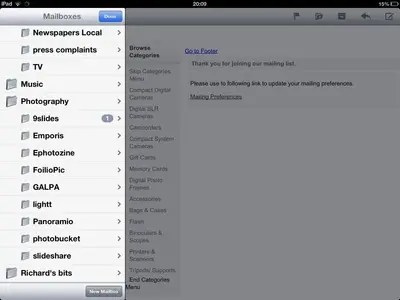
Now, do you have the mail app set up for Gmail? It's possible to create a new folder via the iPad. See this screen shot which tells all in a nutshell. You will note I am using the mail app.
Use the iPad in landscape. Tap the edit button top right of the folders list to call up the add folder button at bottom right of the folder list. Take it from there. It's