C carioca10 iPF Noob Joined Jul 20, 2012 Messages 9 Reaction score 0 Jul 17, 2013 #1 Please any solution?
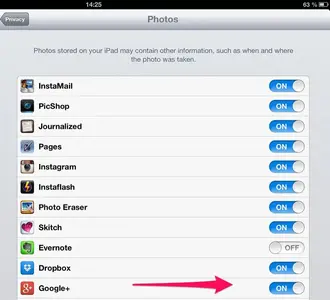
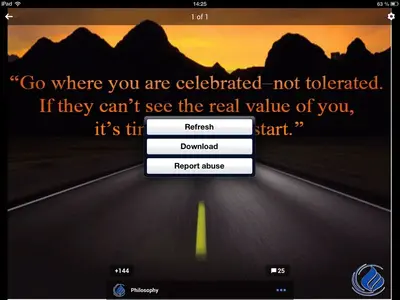
J. A.97 Administrator Staff member Joined Nov 11, 2012 Messages 29,629 Reaction score 38,165 Location Austria Jul 17, 2013 #2 carioca10 said: Please any solution? Click to expand... First, go to Settings - Privacy - Photos, and there enable access to photos for Google +. Then, open the app, tap any picture you'd like to save. In the upper right corner, there's a small sign. Tap it, and this will appear: Now you're able to download the picture. Last edited: Jul 17, 2013
carioca10 said: Please any solution? Click to expand... First, go to Settings - Privacy - Photos, and there enable access to photos for Google +. Then, open the app, tap any picture you'd like to save. In the upper right corner, there's a small sign. Tap it, and this will appear: Now you're able to download the picture.
OP OP C carioca10 iPF Noob Joined Jul 20, 2012 Messages 9 Reaction score 0 Jul 17, 2013 #3 Thank you very much, problem solved! J.A., Thank you very much, problem solved! Regards
J. A.97 Administrator Staff member Joined Nov 11, 2012 Messages 29,629 Reaction score 38,165 Location Austria Jul 17, 2013 #4 carioca10 said: J.A., Thank you very much, problem solved! Regards Click to expand... My pleasure!