What's new

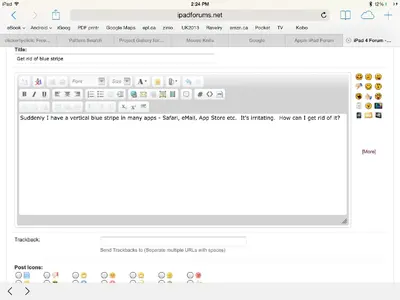
Get rid of blue stripe

canuck101

iPF Noob
Suddenly I have a vertical blue stripe in many apps - Safari, eMail, Settings, App Store etc. It's irritating. How can I get rid of it?
image.webp
Thanks
 
Hi Canuck101 - well, am I missing the 'blue strip' on your attached screen capture? If not already done, 'Restart' and if not successful 'Reset' the iPad - if the problem affected just one app, I would suggest a 'Force Close' first - might want to also provide your iPad model & iOS being used (if 7, did this happen after the upgrade?). Good luck & let us know if any of these maneuvers help - Dave :)

When an app (or several) are misbehaving, I usually go through the following steps:

1. Force Close - open the multi-tasking bar (double tap the 'home buttom' or use multi-gesturing and swipe up):
a. iOS 6.x - press & hold an app until all begin to 'jiggle'; find the offending app(s) and press the 'red circle w/ minus sign' - return to the home screen & try again.
b. iOS 7.x - find the offending app - then press and drag to the top of the screen - return to the home screen & try again.


2. Restart - press & hold the 'Sleep/Awake' (a.k.a. power) button until a red slider appears (may take a few seconds) - move the slider to turn off the iPad; then press & hold the same button until the Apple logo appears - wait for a restart.


3. Reset - press & hold the 'Power' and 'Home' buttons simultaneously until the Apple logo appears - this may take a longer time, so have patience; the iPad will 're-boot' - NOTE that none of these maneuvers will alter your apps, files, or settings.

 
Thought the blue stripe was in the photo -- just checked and it is added in the camera roll also - wherever the background is pure white. Did a reboot. Didn't help. I upgraded to 7.0.3 about a week ago but the blue stripe started about 24 hrs ago so I did not connect the two. Guess I'll have to take it in to the apple store.
 
Thought the blue stripe was in the photo -- just checked and it is added in the camera roll also - wherever the background is pure white. Did a reboot. Didn't help. I upgraded to 7.0.3 about a week ago but the blue stripe started about 24 hrs ago so I did not connect the two. Guess I'll have to take it in to the apple store.

Sorry about your continued problem - just make sure that you followed the directions for 'Reset' correctly (occasionally users stop when the slider appears, wait until you see the Apple logo) - if still not successful, then a visit to the Apple Store may be in order - good luck! Dave :)
 
I have a bold blue stripe around some items, & other times it's the vertical blue stripe. I've done hard boot, etc...nothing. Is this a hint to update to 9.2
 
I have a bold blue stripe around some items, & other times it's the vertical blue stripe. I've done hard boot, etc...nothing. Is this a hint to update to 9.2
Could you show us a screenshot? It would make it easier to tell exactly what the problem is.
 
Hey everyone,

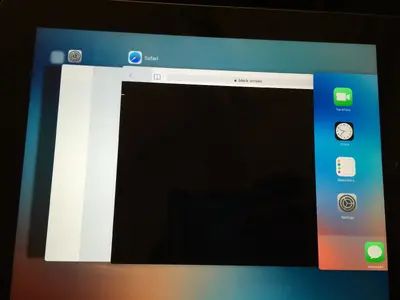
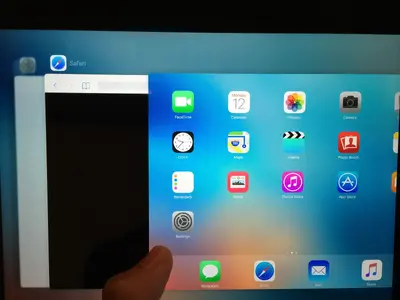
I have the same problem. I've attached a screenshot to show this. On an iPad 4, fully updated 9.3.5.

If you guys have any suggestions, it would be much appreciated!

5yzcVI9.jpg
 
Last edited:
Here is an additional occurrence, it is there on some white colors, but not all white colors.
 

Attachments

  • IMG_4005.webp
    IMG_4005.webp
    337.9 KB · Views: 664
  • IMG_4006.webp
    IMG_4006.webp
    403.1 KB · Views: 644
My best guess is that it has something to do with bad memory on the GPU (Graphics Processing Unit). If it were the screen or a conector it would be more consistent.

At any rate, it is unlikely that it can be fixed without opening up the iPad; something only a maniac or experienced tech should do. (Or someone with nothing to lose).

If you have a nearby Apple Store you can make an appointment and they should do a diagnostic for free, then quote you repair costs if it is a hardware problem.

On the bare chance that it is a software issue, do a reset and see if that helps. Hold down the Home and Power buttons until the Apple Logo appers. Release them and it should reboot.

Good luck.
 

Most reactions

Back
Top