Greg Martin iPF Noob Joined Feb 8, 2014 Messages 61 Reaction score 4 Location Hudson Wisconsin Mar 14, 2014 #1 Sometimes even after I delete all emails from the mailbox,trash and junk, a day or so later they sometimes come back,it's a mystery to me.
Sometimes even after I delete all emails from the mailbox,trash and junk, a day or so later they sometimes come back,it's a mystery to me.
J. A.65 Administrator Staff member Joined Nov 11, 2012 Messages 29,535 Reaction score 37,834 Location Austria Mar 14, 2014 #2 Try to access the email account through a browser and delete them there. Hopefully this will prevent them from reappearing. Perhaps deleting and reinstalling the account will solve your problem, if my first suggestion doesn't work. It will help in most cases.
Try to access the email account through a browser and delete them there. Hopefully this will prevent them from reappearing. Perhaps deleting and reinstalling the account will solve your problem, if my first suggestion doesn't work. It will help in most cases.
Contra iPF Novice Joined Mar 20, 2012 Messages 198 Reaction score 15 Location San Antonio, Tx Mar 14, 2014 #3 you can get this to stop happening a couple ways, like he said or tell your ipad to erase them on the server after downloading...
you can get this to stop happening a couple ways, like he said or tell your ipad to erase them on the server after downloading...
OP OP Greg Martin iPF Noob Joined Feb 8, 2014 Messages 61 Reaction score 4 Location Hudson Wisconsin Mar 14, 2014 #4 I really don't understand either answer . Sorry.
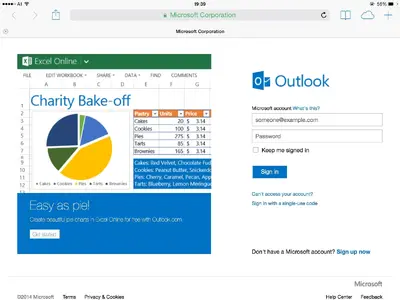
J. A.65 Administrator Staff member Joined Nov 11, 2012 Messages 29,535 Reaction score 37,834 Location Austria Mar 14, 2014 #5 Open Safari or another browser. Access your email account, login. Like this: Go to the emails that reappear on your iPad and delete them. Or: Go to Settings - Mails, Contacts, Calendars. Tap your email account and delete it. That done, set it up again. Hope it's easier to understand this advice. Last edited: Mar 14, 2014
Open Safari or another browser. Access your email account, login. Like this: Go to the emails that reappear on your iPad and delete them. Or: Go to Settings - Mails, Contacts, Calendars. Tap your email account and delete it. That done, set it up again. Hope it's easier to understand this advice.
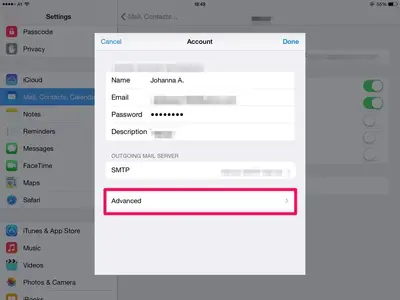
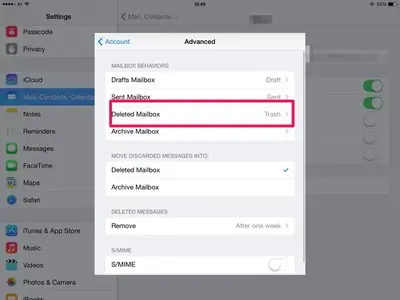
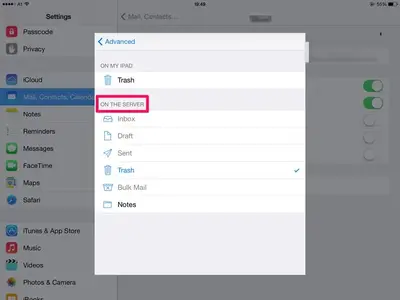
J. A.65 Administrator Staff member Joined Nov 11, 2012 Messages 29,535 Reaction score 37,834 Location Austria Mar 14, 2014 #6 Some accounts give the possibility to choose what to do with deleted emails on the server. In Settings - Mails, Contacts, Calendars tap the email account that shows deleted emails again. Choose "Advanced": Go to "Deleted Mailbox": And choose what you prefer in "On the server":
Some accounts give the possibility to choose what to do with deleted emails on the server. In Settings - Mails, Contacts, Calendars tap the email account that shows deleted emails again. Choose "Advanced": Go to "Deleted Mailbox": And choose what you prefer in "On the server":
OP OP Greg Martin iPF Noob Joined Feb 8, 2014 Messages 61 Reaction score 4 Location Hudson Wisconsin Mar 15, 2014 #7 Thank you J.A. You fixed another one of my problems..
J. A.65 Administrator Staff member Joined Nov 11, 2012 Messages 29,535 Reaction score 37,834 Location Austria Mar 15, 2014 #8 My pleasure.