What's new

Complete computer knownothing!!

grampabill

iPF Noob
Hello All, well here I am threatened with being given something called an I-pad for Xmas!! and knowing absolutely nothing about the subject. My one big question is 'How does an I-pad connect to the internet when there is no computer or broadband connection available in our house?' HELP !! :confused:
 
Hi grampabil--great to have you on board!

Welcome to the iPadForum! This Forum offers so much information related to the iPad and its use. The IPF has many discussion topics related to:

iPad Help|iPad Hacking | iPad Games | iPad for Business and Education | Special Needs iPad Forum | iPad for Health Forum

The iPadForum also includes a Regional Ipad Group for international users across the world. This is a wonderful area to "find" members from your own country.
Regional iPad Groups

If you have not done so, please have a look at our IPF App Tutorial:http://www.ipadforums.net/new-membe...sistance/107524-ipad-forums-app-tutorial.html

Manuals:
Apple - Support - Manuals

https://itunes.apple.com/us/book/ipad-user-guide-for-ios-7/id709634245?mt=11

http://www.ipadforums.net/forum-rules-help-info/2119-forum-rules-everybody-please-read.html
 
Hello MoonlitSonata thank you for taking the time to reply so quickly. Would you please define 'a device that is 3G enabled'?
 
Thank you for the speed again. Does this mean that I will have to open a paying account of some sort?
if you want to activate a data plan on a WiFi + 3G/LTE iPad, you will have to contact a cellular provider and arrange to sign up for and pay for the data plan you choose.
 
Assuming your son lives with you, so you do have internet in your house?

If so, you can buy a router so you can share the internet wirelessly.
 
Haha, well you haven't really given the setup of your situation. I can keep guessing how you can have internet right now and being able to post here, but I'll just stick to you not having internet where you actually live.

Anyway, an iPad cannot connect to the internet WITHOUT internet.
If you're getting a Wi-Fi only iPad, you must contact an ISP to provide you internet connection at home.
If you're getting a WiFi + 3G/LTE iPad (these iPads have SIM cards in them like cellphones), you must contact a carrier/cellular provider to provide you internet connection for your device.

And yes, you must pay for all of them.
 
Last edited:
My son has a pc.

Hi Grampabill - you still seem somewhat confused about the iPad and the internet? I have an iPad 2 w/ Wi-Fi only - connection to the internet requires a 'close-by' Wi-Fi network, e.g. one provided in your house by a broadband connection & a Wi-Fi router, connection in a Wi-Fi hotspot (like Starbucks, McDonalds, et al), a Wi-Fi hotspot that can be setup w/ a cellular device (like a smart phone), or use of a MiFi device (cellular connection which serves as a local Wi-Fi hotspot) - all of these will cost you extra money except visiting the 'free' Wi-Fi hotspots that may be available to you. Regarding your son's home, whether you can connect there will depend on his own home network, if present?

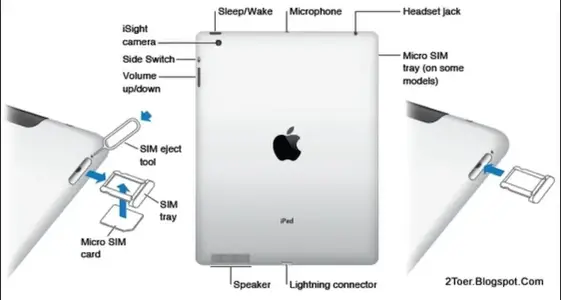
Now, you can purchase an iPad w/ a SIM card slot (see pic below) - the cost is more and a cellular data plan would need to be purchased; these are provided by a number of cellular phone companies - specific SIM cards for each provider will fit the slot as shown.

SO, if you are given an iPad w/ only Wi-Fi, then you'll need to set up a home 'wireless' network to use there, or you can visit friends or family and login as a 'guest' to their 'wireless' home networks, or you can visit businesses that off 'free' public Wi-Fi - I hope that this clarifies your options - Dave :)

Screen Shot 2013-11-18 at 11.55.35 AM.webp
 
Thank you Giradman you have explained how it works admirably. Now I know --- it's a big glorified mobile phone -- except you can't make phone calls!! I will now look forward to it's arrival from Santa.
 

Most reactions

Back
Top