What's new

can't download 4.2, why?

groundzero

iPF Noob
hello all,
Last night I tried to download 4.2 but in the middle of the download I get an error saying I was unable to download caused by internet connection please check settings and try again. I dont understand my internet speed is about 15 mbps but i think it could something else. please help me...i spent about 2 hours trying to download with no success. and yes my itunes is updated to the latest version. please advise.

Thanks!
 
I had the same problem. It continued for at least 6 or 7 attempts and wasted a lot of time. I finally downloaded the update via direct link and then all that’s required is to "shift - click" the update box in iTunes to load and install it. It worked perfectly for me and only took about 15 min to download and install. I'm a new member so will have to post another entry before I can provide the link!
 
Hi

I have the same problem. I downloaded the direct link but can't figure how to get it on my iPad now. Any ideas?
 
Yes - first, remember where your downloaded update file is located and make sure your iPad is connected to iTunes. While on the iPad's "Summary" page (in iTunes), hold down the shift key and at the same time click on the "Update" button. You will be asked for the update file - locate it and click on it to start the install. That's about it - the installation should complete automatically.
 
The reason that the apple server down load via iTunes is slow is because it is overloaded Regardless of how fast your connection is it is like peak hour traffic on a freeway the alternative method users a totally different server so it is quicker
 
You may have answered this....so excuse me if I don't yet understand.

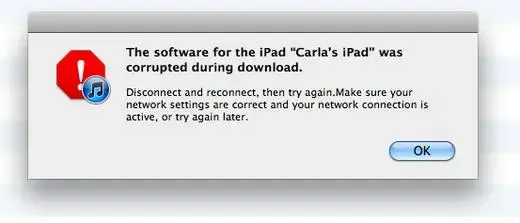
I have now tried to download 4.2 3x. It appears to be downloading fine all the way to the end....551.4MB worth of download and then I get this error message.
"The software for the Ipad was corrupted during download. Disconnect & reconnect and then try again.blah blah blah."

I try again and get the same message. What'sup with this & more important what do I do about it?

THanks.
CM
 

Attachments

  • error message.webp
    error message.webp
    14.5 KB · Views: 582
Last edited:
Try rebooting your pc and turn off your antivirus program if you are running one.

I'm on a Mac....I have restarted it & I did the same for the iPad & I made sure all my software is updated.

I don't think I have an antivirus program...:o At least not that I can remember.

CM
 
No antivirus required on mac

Try rebooting your pc and turn off your antivirus program if you are running one.

I'm on a Mac....I have restarted it & I did the same for the iPad & I made sure all my software is updated.

I don't think I have an antivirus program...:o At least not that I can remember.

CM

You do not require antivirus software on a Mac.
 
I think most of these issues can be attributed to network congestion and general client Internet issues. Try over the next 48 hours after the initial push to download.
 
I think most of these issues can be attributed to network congestion and general client Internet issues. Try over the next 48 hours after the initial push to download.

Thanks. I thought I had waited long enough...I waited a day....sigh.

CM
 

Most reactions

Latest posts

Back
Top