
What's new

5-Row Keyboard for iPad

f4780y

Super Moderator
Staff member
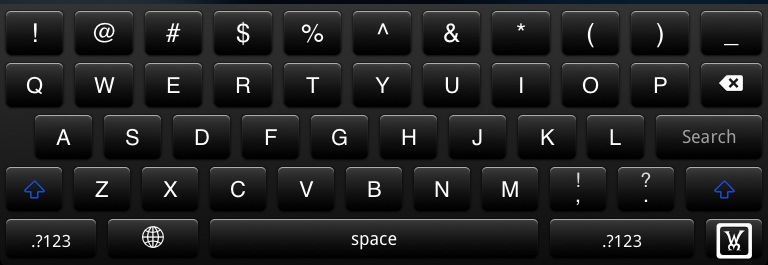
5-Row Keyboard for iPad is a paid Cydia application ($2.99) that does exactly that it says on the tin. It enhances the standard iPad Keyboard with a 5th row which mimics the standard fifth row on a normal keyboard. So no more hassle with numbers or symbols. They are all on the top row, exactly as you would expect. You are able to select whether you prefer numbers or symbols as the default top row, and the selection changes as you would expect when you press the shift key. Have a look at the two screenshots below for an example (these were taken at the spotlight screen which is why the enter key says "search"). Also, I have combined 5-Row Keyboard for iPad with Black Keyboard (a free Cydia Tweak) for added effect! Gotta love the bl4ck!

01e0db15.png


2a7a1e29.png


Another great reason to Jailbreak, I hope you'll agree!
 
Last edited:
Yeppers, that there is one of my favorite tweaks. I keep my symbols as the top row (since I am a consistent parentheses - and dash! - user). Handy to save myself that key stroke. :D

Very nice overview.

Marilyn
 
In addition to Winterboard activation, you also have to go to Settings>Keyboard>International Keyboards>English> ... then pick one of the 5Row selections.

Marilyn
 
f4780y said:
5-Row Keyboard for iPad is a paid Cydia application ($2.99) that does exactly that it says on the tin. It enhances the standard iPad Keyboard with a 5th row which mimics the standard fifth row on a normal keyboard. So no more hassle with numbers or symbols. They are all on the top row, exactly as you would expect. You are able to select whether you prefer numbers or symbols as the default top row, and the selection changes as you would expect when you press the shift key. Have a look at the two screenshots below for an example (these were taken at the spotlight screen which is why the enter key says "search"). Also, I have combined 5-Row Keyboard for iPad with Black Keyboard (a free Cydia Tweak) for added effect! Gotta love the bl4ck!

One word of caution however. 5-Row Keyboard for iPad does not play well with iFile (another popular Cydia App). If you are an iFile user, simply switch into iPad Settings before you start iFile, turn off the 5-Row Keyboard, start iFile, then re-enable 5-Row keyboard. This will let you use the normal 4 row keyboard in iFile, but keep the 5-Row active in all other apps.

Another great reason to Jailbreak, I hope you'll agree!

Can you give the link, please. I can't locate in on Cydia. Thanks

Sent from my iPad using iPF
 
Can you give the link, please. I can't locate in on Cydia. Thanks

Sent from my iPad using iPF

Can't you just open Cydia, switch to "search" tab, and type the number "5". There are only a limited number of apps that start with the number 5. 5-Row Keyboard for iPad is one of them...
 
How can you make it black? I just found one 5-row keyboard so assume that we can make it black somehow... Lol. Sorry but I a total noob to all this stuff.

Thanks!

iFrog - Sent from my iPad2 using iPF
 
Rokrdude2 said:
Download black keyboard(Free) from cydia

Sweet, thanks!

Wow, I'm really loving all this tweaks :-)

iFrog - Sent from my iPad2 using iPF
 
Why the hide keyboard changed to Wm? Look like is part of the JB but I just want to know... Curious but still do the job.

iFrog - Sent from my iPad2 using iPF
 
So this is yet another tweak that doesn't work on my iPad 2.

I basically went down the list in the essential app thread and downloaded what seemed interesting to me. Black keyboard works fine, and all my other Winterboard apps work as well. Why doesn't this work?
 

Most reactions

Latest posts

Back
Top