Hmmm ... Cant set the hw layout to US. Only Danish, German or France is avaliable. And i cant ad a new hw profile. Changing the language to english thoug, gives me the @ on <shift>+2. But then i dont have the Danish caracters :-( I tried several international settings in the keyboard an language menues, but nothing helps. Guess i just have to live with it. But thanks for the hints
Ok, it didn't occur to me that you weren't using an English keyboard layout. My provincialism is showing.
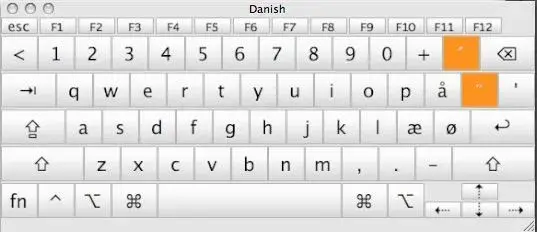
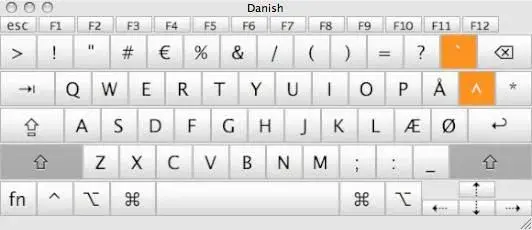
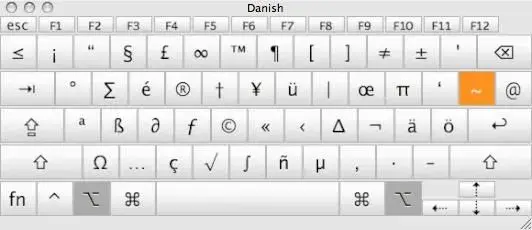
Anyway, I changed the language on my iMac, and used the screen keyboard tool to display the keyboard layout for normal, shifted, and with the option key.
The @ symbol is Option right slash (single quotation mark on the Danish layout); the last key on the right in the top row of letters at any rate.
I'll attache the three screen shots I took so you can use them as reference. Hopefully they are close enough to your layout to work. I have no idea what the two orange keys are about.
Edit. Oops, messed up the shifted keyboard shot. Fixing now.
Nope. messed up again. Hopefully I'll get it right this time.
Hi Twerppoet
Sorry i havent replied to your post. Thanks a lot for your suggestions. Unfortunately it seams like nothing wll solve the probleme with the danish keyboard laout. I think i have tried everything now, but no luck. Guess i just have to bring up the iPad keyboard when writing a @