What's new

Updating Applications - Why the Password

peled

iPF Noob
I noticed something funny with regard to application updates.
If you go to the App Store Application and you activate the Update ICON, the program will ask you for a password.
On the other end if you do nothing, you will noticed, that your updates are done in the background, with no need for a password.
So, why the password in the 1st place?
 
My updates never happen in the background, didn't even know it was possible. I always have to initiate them and there is always at least one password request.
 
+3. As an example, my husband seems never to pay attention to the badge on the app store icon and install upgrades. We have many of the same apps. I install every time I see upgrades available. Consequently he is running old versions and I am running new. His do not upgrade in the background and he has to input the password to install, just ae I do.
 
But why the password? Even though it is an update, it is still technically a purchase even though you are not paying any money. The whole idea in asking for a password is for your own security to make sure that you and only you (or someone that you have given your password to) can download apps to your iPad.
 
It is so if you give an app to a friend they cant keep updating it without buying it, unless you give them your password. Hence you can't pirate software this way. In order to give someone an app you have to do it the apple way or buy them a iTunes gift card

Sent from my iPad using iPF
 
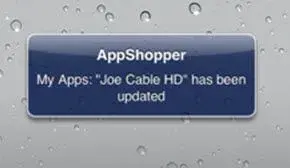
That is strange, no one has automatic upgrade. Many times I open my iPAD in the morning, and I am seeing a note that Application "So & So" was updated. Next time I'll have it on the screen I'll snapshot it .
I agree that there is no configuration to define auto-update, so why is it only me ?
Is it because most of my app's were downloaded through the use of AppShopper ?
 
I "bought" a free app to try app shopper and it opened to the app store and the rest was normal install asking for my password. Do you never see the upgrade badge beside the app store? Very strange. To be truthful I would not like a behind the scenes upgrade. I always check to see what the upgrade will do, what bug fixes it has, etc.
 
Now get it. It is the AppShopper Application

It seems that all the applications I downloaded in the past through AppShopper, Are automatically updated. Here is one example. I opened my iPAD and found that message
 

Attachments

  • updated.webp
    updated.webp
    4.3 KB · Views: 325
Suspect most of the updates are just the latest version of the full app. Saves time, storage and patching errors.
 
It seems that all the applications I downloaded in the past through AppShopper, Are automatically updated. Here is one example. I opened my iPAD and found that message

I think that is just telling you the app has an update. I don't believe AppShopper can bypass app store. If you go to download an app it merely takes you to the app store to get it.

That said, ironically apps do in fact update in the background. The process doesn't start until you tell it to, but once initiated it will update many apps in the background while you can continue to do other things with the device.


Michael
 
Last edited:
Suspect most of the updates are just the latest version of the full app. Saves time, storage and patching errors.

Not most of the updates.... all of them are complete applications and never just an update. Developers submit complete apps for approval, whether new or updated.

Heck even updates to iOS itself are complete.... even if just a minor change (like 3.2.1 to 3.2.2)


Michael
 
Yep.
I Agrre with the last 2 comments. It is the AppShopper telling me, that an application that has been downloaded through it, has an update.
And yes once you started an Update, you can move on to something else, it'll do it in the background.
 

Most reactions

Latest posts

Back
Top