What's new

problem with this site & others on ipad?

Missmouse3

iPF Novice
Joined
Dec 27, 2012
Messages
162
Reaction score
1
Ive found this site ( & a few others) load in a different format when I go to them on my ipad! The website is pretty useless actually then - its as if most of the options are missing & its very difficult to navigate around to find or post anything! Is there some way to make the websites look exactly like I see them on my PC ( which i am currently using!)
I tried to make a hotel booking using ipad just now but this "different" display prevented me from doing so! - very annoying!:thumbsdown:
Thanks
 
The website probably uses JavaScript which would prevent the iPad from displaying it properly.

The only way around this is if there is an app for the hotel booking system.
 
The website probably uses JavaScript which would prevent the iPad from displaying it properly.

The only way around this is if there is an app for the hotel booking system.

Seems that would be strange as this site is for ipad discussion is it not?:confused:
 
The website probably uses JavaScript which would prevent the iPad from displaying it properly.

The only way around this is if there is an app for the hotel booking system.

Seems that would be strange as this site is for ipad discussion is it not?:confused:

Kevin was referring to the hotel booking site, not this site, when posting his answer.
 
That's right, and as far as this site goes, I use Safari on my iPad and MBP, and find no difference between them. What differences are you finding?
 
That's right, and as far as this site goes, I use Safari on my iPad and MBP, and find no difference between them. What differences are you finding?

well for example, im on my pc at moment & I can see all kinds of graphics (mainly ads!) smileys at the side & plenty of navigation options at the top of the page, a box that Im typing in with options for different text etc, but if I log in using my ipad all I get ( thats if I can even find this thread!) is one liners of text only & very difficult methods of posting!
Thats what Im trying to ask about. This doesnt happen that often but when it does its annoying cos I have to go to the pc to make any sense of things!
 
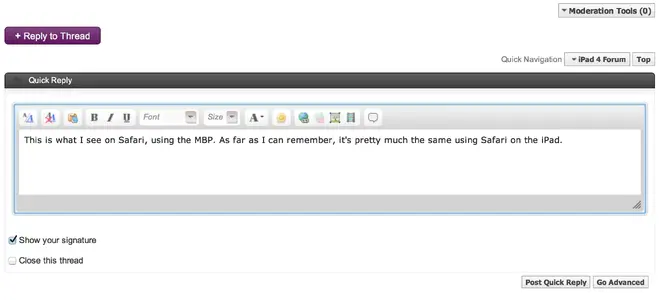
This is what I see on Safari, using the MBP. As far as I can remember, it's pretty much the same using Safari on the iPad.

Screen Shot 2013-05-19 at 11.19.27 AM.webp

I can't show a full screenshot because the forum software won't accept the file.
 
Soon as I can get my iPad without the risk of being bitten by a Minecrafting 10 year old, I'll see if there's any noticeable difference.
 
well for example, im on my pc at moment & I can see all kinds of graphics (mainly ads!) smileys at the side & plenty of navigation options at the top of the page, a box that Im typing in with options for different text etc, but if I log in using my ipad all I get ( thats if I can even find this thread!) is one liners of text only & very difficult methods of posting!
Thats what Im trying to ask about. This doesnt happen that often but when it does its annoying cos I have to go to the pc to make any sense of things!

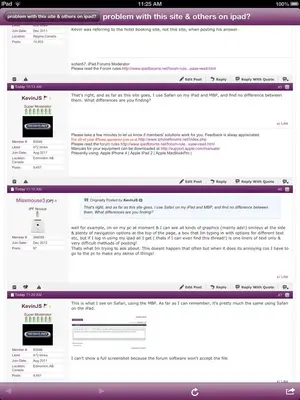
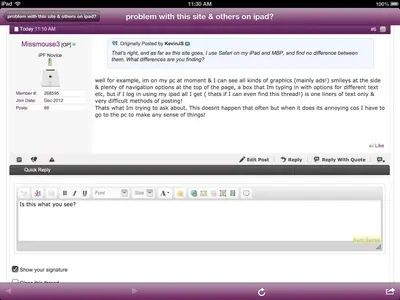
This is what I see when I go to the website on my iPad.


image-1665553042.webp

image-1447441282.webp

image-3877708526.webp

Are you saying that this is not what you see?
 
Last edited:
This is what I see on Safari, using the MBP. As far as I can remember, it's pretty much the same using Safari on the iPad.

View attachment 41821

I can't show a full screenshot because the forum software won't accept the file.

yeh thats what i see on my pc but on my ipad i just get a one liner! When I open the ipadforum program, all I get is a header "ipadforums" a blank page & then a few icons at the bottom which read : forums, current,messages,profile,search,subscribed,online,more. clicking on any one of these does open a page but it has very little info on it totally unlike the page im on just now using pc!
 
Briefly press Home and Sleep/Wake buttons on the iPad, and the screen will flash white. You will then find a screenshot in your Camera Roll, which you can upload.
 
Briefly press Home and Sleep/Wake buttons on the iPad, and the screen will flash white. You will then find a screenshot in your Camera Roll, which you can upload.

Ok I've got the screenshot but how then do I paste it to this reply?
Btw I've just found a weird thing, if I open an email reply to ipad forums, I see the normal webpage! It's only when I open the site from my iPads home page or whatever it's called!
 

Most reactions

Latest posts

Back
Top Bottom