R Ramburly iPF Noob Joined Mar 22, 2014 Messages 1 Reaction score 0 Mar 22, 2014 #1 Ow do I move my aps/icons from one screen to another?
Contra iPF Novice Joined Mar 20, 2012 Messages 198 Reaction score 15 Location San Antonio, Tx Mar 22, 2014 #2 just like with Android, just hols the app and move it to the far side and hold for a couple secs and it will scroll screens
just like with Android, just hols the app and move it to the far side and hold for a couple secs and it will scroll screens
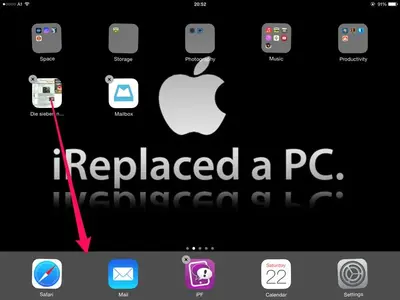
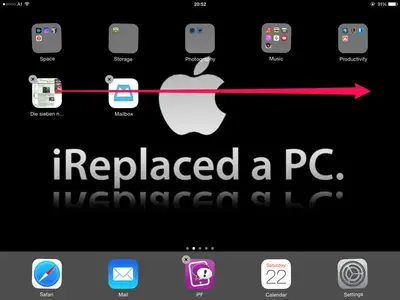
J. A.96 Administrator Staff member Joined Nov 11, 2012 Messages 29,626 Reaction score 38,163 Location Austria Mar 22, 2014 #3 Hi, welcome to iPF! There are two ways to move them: Tap and hold the app until they start to wiggle. 1. Drag the app to the dock at the bottom of the screen: Change screens and drag the app upwards on the next screen. 2. Drag the app to the border of the screen. The homescreen willl switch to the next screen. Release the app and press the Home button. Hope that helps.
Hi, welcome to iPF! There are two ways to move them: Tap and hold the app until they start to wiggle. 1. Drag the app to the dock at the bottom of the screen: Change screens and drag the app upwards on the next screen. 2. Drag the app to the border of the screen. The homescreen willl switch to the next screen. Release the app and press the Home button. Hope that helps.