C cayleg iPF Noob Joined Aug 18, 2011 Messages 36 Reaction score 5 Location Victoria Canada Apr 17, 2013 #1 Ok I was looking thru my iPads settings and under accessibility I found speak selection / dialects So if you enable it your iPad will speak a selected section of text and you can change the accent to Irish,British,American and more so cool
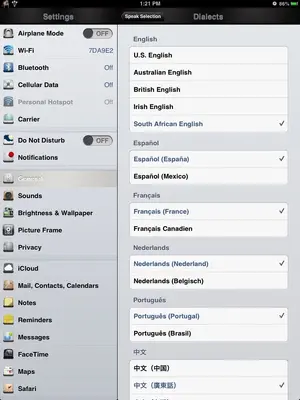
Ok I was looking thru my iPads settings and under accessibility I found speak selection / dialects So if you enable it your iPad will speak a selected section of text and you can change the accent to Irish,British,American and more so cool
K Kaykaykay iPF Noob Joined Apr 28, 2011 Messages 6,952 Reaction score 446 Apr 18, 2013 #2 Siri speaks to me in Chinese, my native language, but she speaks it terribly.
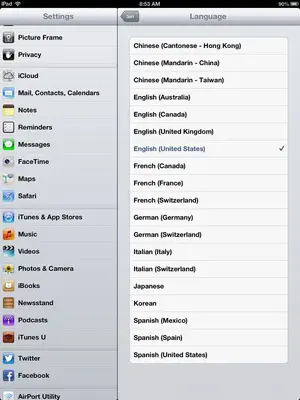
J. A.63 Administrator Staff member Joined Nov 11, 2012 Messages 29,529 Reaction score 37,817 Location Austria Apr 18, 2013 #3 You'd have more choice if you go to Siri - Language. There are 19 dialects, including German, ..., which you can't find in Accessibility. Last edited: Apr 18, 2013
You'd have more choice if you go to Siri - Language. There are 19 dialects, including German, ..., which you can't find in Accessibility.
scifan5763 Administrator Staff member Joined Dec 3, 2011 Messages 38,001 Reaction score 33,156 Location Regina,Canada Apr 18, 2013 #4 Here's the full set of languages supported by Siri.
OP OP C cayleg iPF Noob Joined Aug 18, 2011 Messages 36 Reaction score 5 Location Victoria Canada Apr 18, 2013 #5 I wanted to keep Siri the way it is But reading text Is not sed as much so i like to play with the setup
I wanted to keep Siri the way it is But reading text Is not sed as much so i like to play with the setup