What's new

Looking for app that can view redlined Word docs

pdaunno

iPF Noob
Hello everyone,

I'm looking for an app that is able to open and view Word documents that have been redlined. What I've been doing which isn't very elegant is saving the doc on my computer as a PDF then I use GoodReader to open it. I'd much rather be able to open the doc directly as a Mail attachment into an app. Preview and even opening in GoodReader loses all of the redlined changes.

Any suggestions?

Thanks!
-Paul
 
Cant you use pages? Im 90% sure it's compatible with word and it's a great text editing app too.

Pages is certainly compatible with Word but I don't know if in fact it can view a Word doc that has been marked up (i.e. redlined). If someone can confirm that it would be helpful. More specifically, that Pages for iPad can do this not Pages on the Mac since they are not completely identical.

-Paul
 
Last edited:
Pages is not compatible with Word except for the most basic documents. I've found it unusable for that on the iPad. And as for viewing redlined documents on the iPad, forget it. There is no app that does it AFAIK. The best you can do is get someone to send you a pdf of the redlined version then mark it up as you would in manuscript form using GoodReader or iAnnotate.
 
By redlined, do you mean documents that have comments inserted (where you've chosed to "track changes" in Word)?

Because if it is, DocumentsToGo will open those files and you can read the comments. You can also edit the document (although I am unsure if you can edit the comments - though you can delete them).

I have the Docs2Go Premium Suite, so I am unsure if this viewing/editing function is in the other version....

If that's not what you meant ... nevermind.

Marilyn
 
By redlined, do you mean documents that have comments inserted (where you've chosed to "track changes" in Word)?

Because if it is, DocumentsToGo will open those files and you can read the comments. You can also edit the document (although I am unsure if you can edit the comments - though you can delete them).

I have the Docs2Go Premium Suite, so I am unsure if this viewing/editing function is in the other version....

If that's not what you meant ... nevermind.

Marilyn

I'm not the OP but I bet that's exactly what he meant. Good info, thank you!
 
By redlined, do you mean documents that have comments inserted (where you've chosed to "track changes" in Word)?

Because if it is, DocumentsToGo will open those files and you can read the comments. You can also edit the document (although I am unsure if you can edit the comments - though you can delete them).

I have the Docs2Go Premium Suite, so I am unsure if this viewing/editing function is in the other version....

If that's not what you meant ... nevermind.

Marilyn

I'm not the OP but I bet that's exactly what he meant. Good info, thank you!


Yes, that is exactly what I am referring to; tracking of changes and the comments. I would likely buy the Premium Suite since it's only $7 more and it seems to have some extras I might want like iDisk, Dropbox and Powerpoint.

Just so I'm clear are you saying that it will allow me to view & edit Word docs that have tracking changes enabled? I've attached a sample file if that will help.

Thanks!
-Paul
 

Attachments

Okay.

I've attached 3 pictures and your Word document that I modified with Docs2Go.

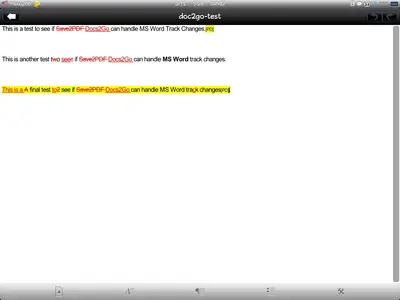
As you can see, this is what you get. Picture 1 is what I see when I open Docs2Go. I downloaded it via Atomic web browser and then opened it in Docs2Go.

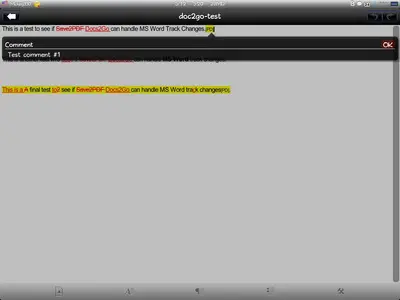
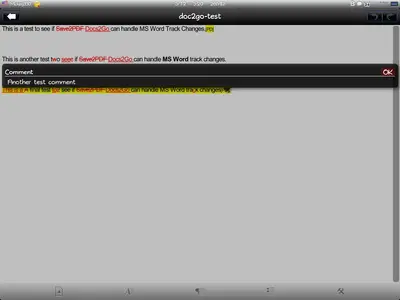
Pictures 2 and 3 are after I clicked on your initials for comments.

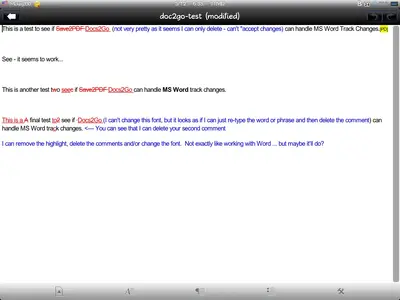
Picture 4 is after I made some editing to the document (all from within Docs2Go).

By the way, I saved the Word file to my Dropbox from within Docs2Go, so that's pretty neat.

Last, I've attached the modified document that you see in picture 4. I opened it in my Word 2007 and it looks fine to me.

So, that's what you get. Let me know if you want me to do anything else to see if this'll work for you.

Marilyn
 

Attachments

  • DocumentView.webp
    DocumentView.webp
    18.2 KB · Views: 868
  • Comment1.webp
    Comment1.webp
    16.6 KB · Views: 768
  • Comment2.webp
    Comment2.webp
    17.5 KB · Views: 670
  • MyMods.webp
    MyMods.webp
    34.7 KB · Views: 709
  • doc2go-test (modified) (01).doc
    doc2go-test (modified) (01).doc
    26.5 KB · Views: 541
Outstanding, thank you for taking the time to post that. I'm not the OP but I appreciate knowing that I can deal with MSWord and track changes using the iPad.
 
Okay.

I've attached 3 pictures and your Word document that I modified with Docs2Go.

As you can see, this is what you get. Picture 1 is what I see when I open Docs2Go. I downloaded it via Atomic web browser and then opened it in Docs2Go.

Pictures 2 and 3 are after I clicked on your initials for comments.

Picture 4 is after I made some editing to the document (all from within Docs2Go).

By the way, I saved the Word file to my Dropbox from within Docs2Go, so that's pretty neat.

Last, I've attached the modified document that you see in picture 4. I opened it in my Word 2007 and it looks fine to me.

So, that's what you get. Let me know if you want me to do anything else to see if this'll work for you.

Marilyn

WOW!! Thank you so much Marilyn for taking the time to do that! It looks to me like it will do everything I want. I don't do a lot of editing mostly just viewing. I'd rather take my iPad into a meeting as we review these types of docs rather than printing 20,30,40+ pages only to toss it out after the meeting. I think I'll buy the Docs2Go Premium suite and see what else I can do with it :)

-Paul
 
An update - I finally bought Documents to Go Premium this week and so far it works very well for viewing tracked changes and comments. I can open the files directly in my iPad Mail and see the redlines ( tracked changes ) and comments. I've been experimenting a little with the app wrt settings, formatting docs, DropBox and so far I like it very much. Seems like it was a good purchase for me.
 
So does it redline changes in the doc in the actual app if you make text changes in Documents 2 Go?
 

Most reactions

Latest posts

Back
Top