What's new

iOS 7 on iPad 2

For those who don't like the look of it .. Did you not research it prior to updating. Surely you went in Apple to see what was going to change?
 
BTW: If you swipe down on the home page to type into Spotlight,the keyboard is dark gray.
 
It's another security measure implemented by Apple. If there is some coding in the app, the iPad will recognize it and set it up for you to decide if you wish the app to have access. Don't know why the app would want access - but at least you can stop it.

Thanks Marilyn!
 
...i upgraded my iPad 2(Wi-fi, black) to ios7 from 6...the upgrade went well without any problem but after it rebooted, all was gone...it is now stuck at recovery mode showing an USB image directing to i-tunes..restoring is not possible from i-tunes either...all in wanted is to keep updated but now i'm ending with a unusable i-pad....I HATE APPLE!! **** THEM!!! :mad:
 
I think u should go to purchased items and download again same apps in ur ipad it also make backup

I also get same trouble but after download apps to my purchased items all i get same try it
 
I think the screen creates enough light so flashlight not needed ;) as for calculator, ipad never came with it preset anyways.

Av hd player is the best way to watch movies ipad top most app
Should Must install all ipad users
 
Ok so what I'm noticing that's really slow after the update for me is safari. When I search google & click on something it's taking forever to come up and even sometimes timing out! I never used to have this issue. I went into settings and cleared the history, I've closed all open apps, is there anything else I can do to speed up the browser?
 
BTW: If you swipe down on the home page to type into Spotlight,the keyboard is dark gray.

I liked that gray keyboard a lot. I wished they'd made that the keyboard for everything. I didn't understand why they have different keyboard color themes for different things.


Sent from my iPad using Tapatalk
 
...i upgraded my iPad 2(Wi-fi, black) to ios7 from 6...the upgrade went well without any problem but after it rebooted, all was gone...it is now stuck at recovery mode showing an USB image directing to i-tunes..restoring is not possible from i-tunes either...all in wanted is to keep updated but now i'm ending with a unusable i-pad....I HATE APPLE!! **** THEM!!! :mad:

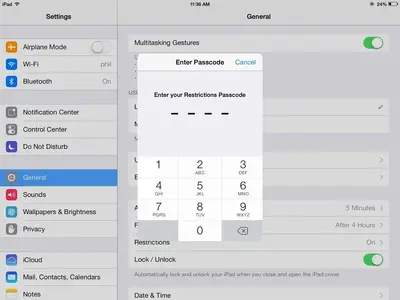
In Settings - General - Restrictions.

Did that and this is what I got.
 

Attachments

  • image.webp
    image.webp
    34.5 KB · Views: 363

Most reactions

Latest posts

Back
Top Bottom