What's new

Extra folder in Mail account

In my MaiL account I have three folders, Inbox, Sent and Trash. I would very much to be able to open an additional folder or two to keep e-mails but not in the inbox. When I am looking at mail in the inbox the system invites me to move messages to another folder but will not let me create one. Can you tell me how to do this?

Dickblakemore
 
Dickblakemore said:
In my MaiL account I have three folders, Inbox, Sent and Trash. I would very much to be able to open an additional folder or two to keep e-mails but not in the inbox. When I am looking at mail in the inbox the system invites me to move messages to another folder but will not let me create one. Can you tell me how to do this?

Dickblakemore

I'm sorry to say that the Native Mail App on the iPad does not allow for the creation of new folders, I would also like to have this feature. You can however create another account which does have folders, I have heard that Gmail has this feature. So perhaps this is one way for you to go.

Sent from my iPad using iPF
 
leelai said:
You can however create another account which does have folders, I have heard that Gmail has this feature. So perhaps this is one way for you to go.

Sent from my iPad using iPF

GMail actually gives you the possibility, but also not from within the native email App.
You will have to create the folders in the web-version of GMail, then you can use them on the iPad.
 
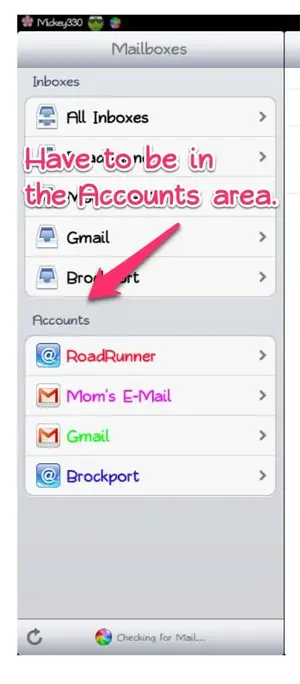
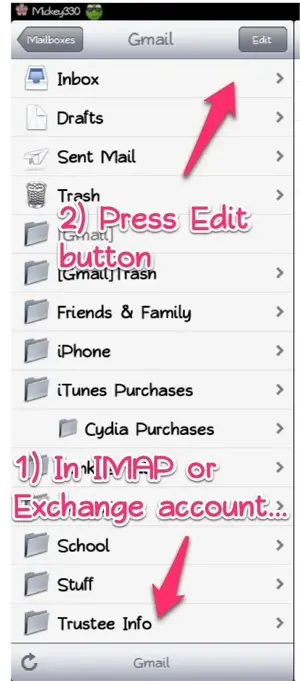
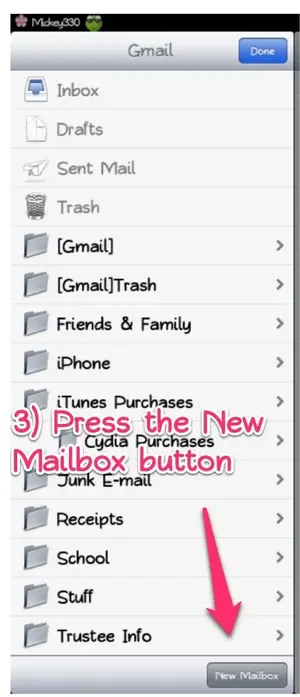
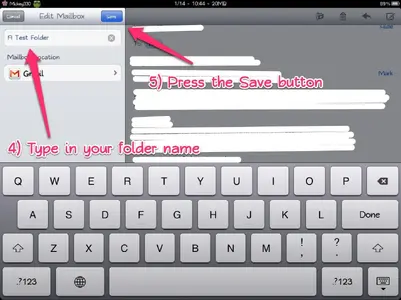
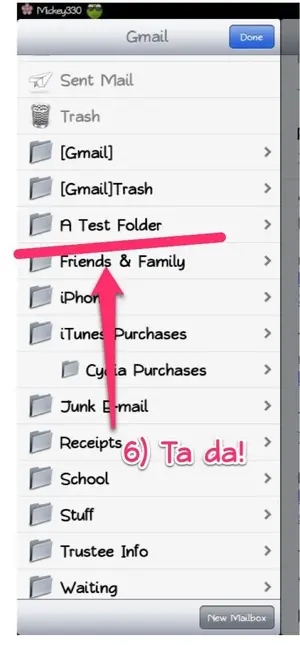
Actually, you can create folders on the iPad, in the Mail app, as long as you are using an IMAP or Exchange e-mail account (it will not work with a POP account).

Here are pictures/the steps in how to do this:

photo 1.webp

photo 2.webp

photo 3.webp

photo 4.webp

photo 5.webp

The created folder is there on your iPad and it shows up in Gmail on the Web.

Let me know if I've left out a step ... and how it works for you. Good luck.

Marilyn

P.S. And, yeah, I wanted to play with Skitch, like The Archangel and twerppoet ... but still, they're pretty good instructions! :D
 
Mickey330 said:
Actually, you can create folders on the iPad, in the Mail app, as long as you are using an IMAP or Exchange e-mail account (it will not work with a POP account).

Let me know if I've left out a step ... and how it works for you. Good luck.

Marilyn

P.S. And, yeah, I wanted to play with Skitch, like The Archangel and twerppoet ... but still, they're pretty good instructions! :D

Thanks a lot, Marilyn, overlooked that - thanks to your great Skitch instructable even I found it ;o) !!!
 
Gabriel1 said:
I've got competition!

The Archangel

I did one too yesterday, couldn't let you guys have all the fun. It's a great tool!

Sent from my iPad using iPF
 
Mickey330 said:
Actually, you can create folders on the iPad, in the Mail app, as long as you are using an IMAP or Exchange e-mail account (it will not work with a POP account).

Here are pictures/the steps in how to do this:

<img src="http://www.ipadforums.net/attachment.php?attachmentid=8909"/>

<img src="http://www.ipadforums.net/attachment.php?attachmentid=8910"/>

<img src="http://www.ipadforums.net/attachment.php?attachmentid=8911"/>

<img src="http://www.ipadforums.net/attachment.php?attachmentid=8912"/>

<img src="http://www.ipadforums.net/attachment.php?attachmentid=8913"/>

The created folder is there on your iPad and it shows up in Gmail on the Web.

Let me know if I've left out a step ... and how it works for you. Good luck.

Marilyn

P.S. And, yeah, I wanted to play with Skitch, like The Archangel and twerppoet ... but still, they're pretty good instructions! :D

Thank you very much that worked a treat.
dickblakemore
 
Thank you Mickey330! I also couldn't set up new folders,Nathan I followed Mickey330s approach but using the ICloud email account which is provided on my ipad and it worked. Brilliant and thanks.
 
I tried this and followed all your instructions which were great. However, no new folder appeared and I got a pop up box which said ' couldn't create the folder on this server'

Don't understand this as I have an exchange account.
Any suggestions?

The server I am on is. m.google.com
 
Last edited:
These instructions are for using the actual Mail app on the iPad. It looks as if you are trying to do this using the Web (via Safari). So, is this from using Safari or the Mail app?

Marilyn
 

Most reactions

Latest posts

Back
Top