What's new

Calendar sync

rwsinky

iPF Noob
I have an IPad mini 3 that I have set up but it is not pulling my calendar from ICloud. This is frustrating as I have 2 IP 6's and another IPad mini that work great. I have set the 2 IPad's side by side and campared settings and it still is not syncing. Where is the Icloud id stored that tells the Ipad where to get it's calendar info from? The IPad in question also does not show as a device when I log into ICloud. The other 3 do. HELP!!!
Russ
 
Look at Settings - iCloud: is Calendars enabled?

If it is, open the Calendar app, tap Calendars at the bottom and make sure your iCloud calendar is check marked.
 
JA, Thanks for the reply. I wound up deleting the ICloud account on the IPad and setting it back up. That fixed the problem. I must have fat fingered something when setting up.
 
No problem. Yes, I meant the email address.

If your devices are not up to date, then update them. The latest iOS is 9.3.1 for iPad 2 and later, as well as iPhone 4s and onwards.

Take a look at your date and time settings (Settings - General - Date & Time), they should be correct, or else the devices won't sync.

Make sure your internet connection is working correctly. Try opening a random website in Safari on both devices.

Then take a look at your settings in Mail, Contacts, Calendars - Calendars - Default Calendar. It should be the same calendar on both iDevices.

If the calendar still doesn't sync, open the Calendar app (both devices again). At the bottom, you'll find "Calendars". Tap it, to take a look at the calendars enabled in the app. Again: it should be the same one(s) on both devices.

Another option would be to drag down the calendars view (still in the Calendar app, in Calendars). A spinning wheel will show that it's trying to sync. Missing events should appear afterwards.

Hope that helps.

 
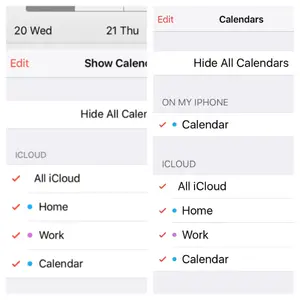
On the iPhone another option for Calendar is visible but isn't on the iPad. I guess this is where the problem is. But why is there not the additional calendar on the iPad? I haven't added one from the App Store. It's the default apple calendar on both.
 

Attachments

  • image.webp
    image.webp
    50.9 KB · Views: 426
It looks like you created an additional calendar on your iPhone. I can't find a way to duplicate your problem on my iPhone. Calendars are tied to the email account where Calendar is enabled. I can't imagine an email account called "On my iPhone".

It's possible to save notes to one device only, without syncing them, but I can't find this option for Calendars.

Are there any events connected to this calendar? If so, edit the information, and use one of your other calendars. Then they should start syncing to the iPad.
 
Yes I agree, so I have had to delete the additional iPhone calendar, losing past events, but not important as have all in paper diary. Now both sync fine. Thanks for your help.
 
Actually just unticking the extra calendar on the iPhone was all that I needed to do. So my past events are still on the phone should I need them.
 

Most reactions

Latest posts

Back
Top